This will be a thread for people to share their experiences measuring amplifiers, preamplifiers, and speakers using the REW software package. Good experiences and bad. How did it go? Which REW version did you use? What operating system? I’ll start things off with my latest experience.
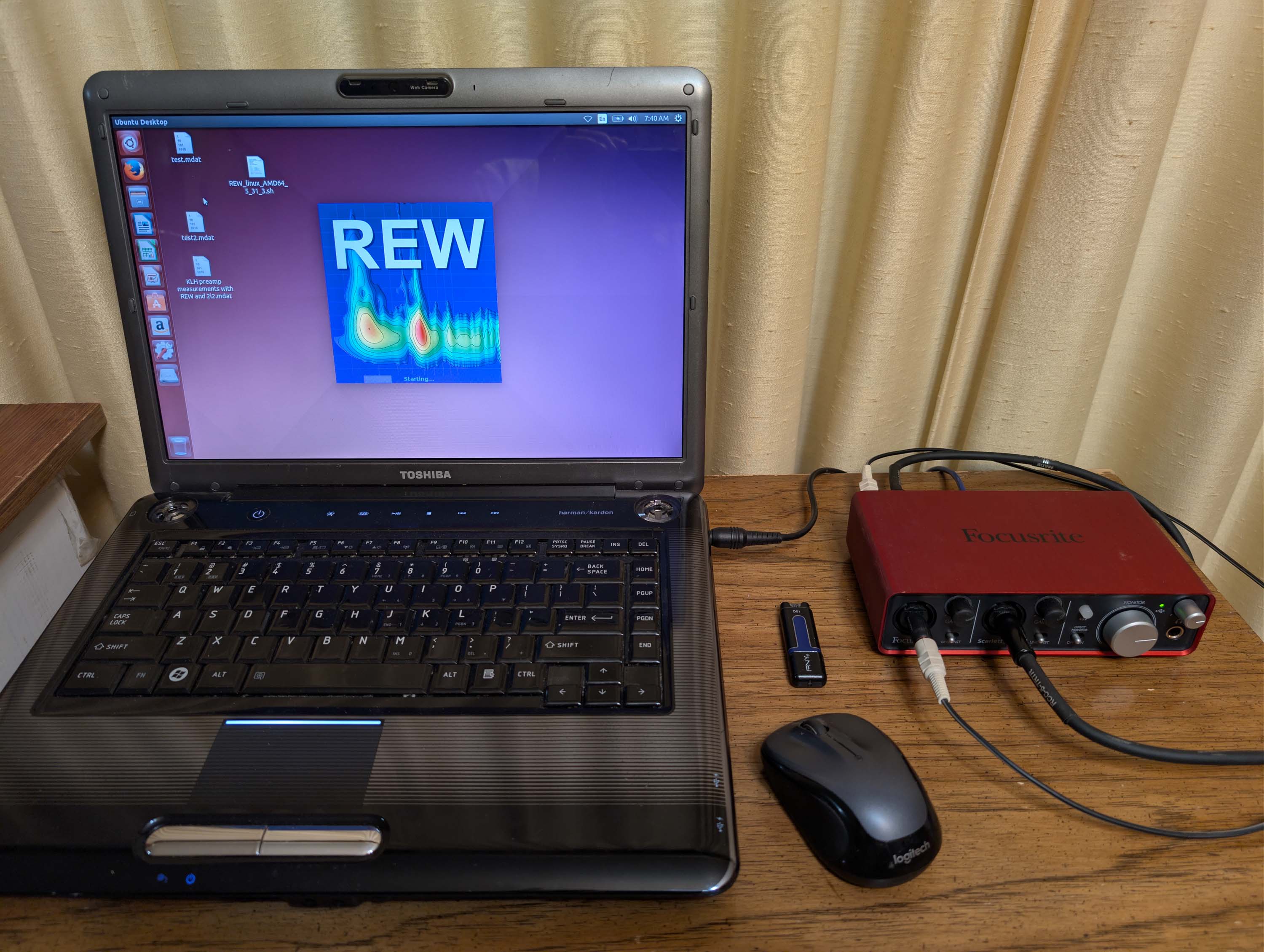
I’m currently setting up a dedicated REW testing station next to my electronic workbench for running frequency response plots, RTA plots, and HD profile plots on amps and preamps. @DanP generously gave me his old, used laptop, which still works good, so I have decided to press it back into service as a dedicated, off-line measuring tool.
Current versions of REW no longer work with older 32 bit operating systems, so I initially tried to install an old, legacy version of REW that can still run on Window Vista. But I had to abandon that idea because 32 bit XP or Vista drivers are not available for the two USB sound cards that I happen to have (Steinberg UR22 MK II and Yamaha Scarlett 2i2 2nd Gen).
REW has a Linux installer that includes the latest Java runtime. And the copy of Linux Ubuntu 14 that I have includes drivers that work with my USB soundcards. So, I re-partitioned the hard drive and installed Ubuntu and the REW Linux installer for version 5.31.3. Took a little bit of head scratching here and there to get it going, but I now have it working very well with both of my USB soundcards. I calibrated REW for both sound cards and took some test measurements this morning on a preamplifier. It all seems to be working perfectly.
Have not installed REW 5.4 yet. Still debugging my 5.31.3 setup with the Scarlett 2i2 before I move on with additional upgrades. Just made another ARTA jig for my dedicated bench setup. I’m setting it up so that I can quickly switch back and forth between measuring power amps, pre-amps, and driver T/S parameters. Just swap a couple cables and go. One problem is that the 2i2 has a very limited line level voltage output. This will not drive most power amps to full output for testing. So I am thinking of switching my setup over to the 2i2’s headphone outputs for more power. If this works, I’ll re-do the calibration file to include the 2i2’s headphone amp in the feedback loop.
Listing of setup mistakes/problems so far:
I initially connected the REF & IMP plugs into the wrong RCA jacks. I’ve done this properly several times on my other setup, but, for some reason, I keep messing it up when I start from scratch! Took several cable swaps to get it right!!
I wired all the grounds together on my new arta jig, and, in doing so, I forgot to install the power amplifier 1k ground isolation resistor (R5). This resistor is clearly shown on @anon37253880 's schematic. I just missed it. On power up, the power amplifier went into protection because I also made an additional mistake of connecting the banana jack backwards (postive on negative and negative on positive). Amp started to buzz like crazy. Almost blew the outputs. (This resistor isolates the power amplifier ground return from the ARTA jig’s signal ground returns.) I installed the resistor, flipped the dual banana plug 180 degrees, and now my amplifier is happy again. No more buzzing or protection circuit clicking!!
Discovered that REW’s “Check levels” screen needs an almost exact match between “In” and “Ref In” when setting levels to run an impedance curve, otherwise the resulting curve comes out as a garbled up looking mess. And the match has to be done with the speaker leads disconnected. I kept trying to do the match with the speaker leads still connected. Finally figured that one out.
I have gotten a small number of Java runtime errors when setting levels, but everything seems to work OK after I hit cancel and try again. Not a major problem.
Due to the open, exposed wiring of my new jig, noise levels are too high for testing preamplifiers. So my plan is to make a separate passive RCA connection box for preamp testing. Completely shielded with multiple RCA input jacks and load resistors (10k, 20k, 47k, 100k). The line level input resistance of the 2i2 is approx 1 meg, so I will be paralleling this down to a more realistic level.
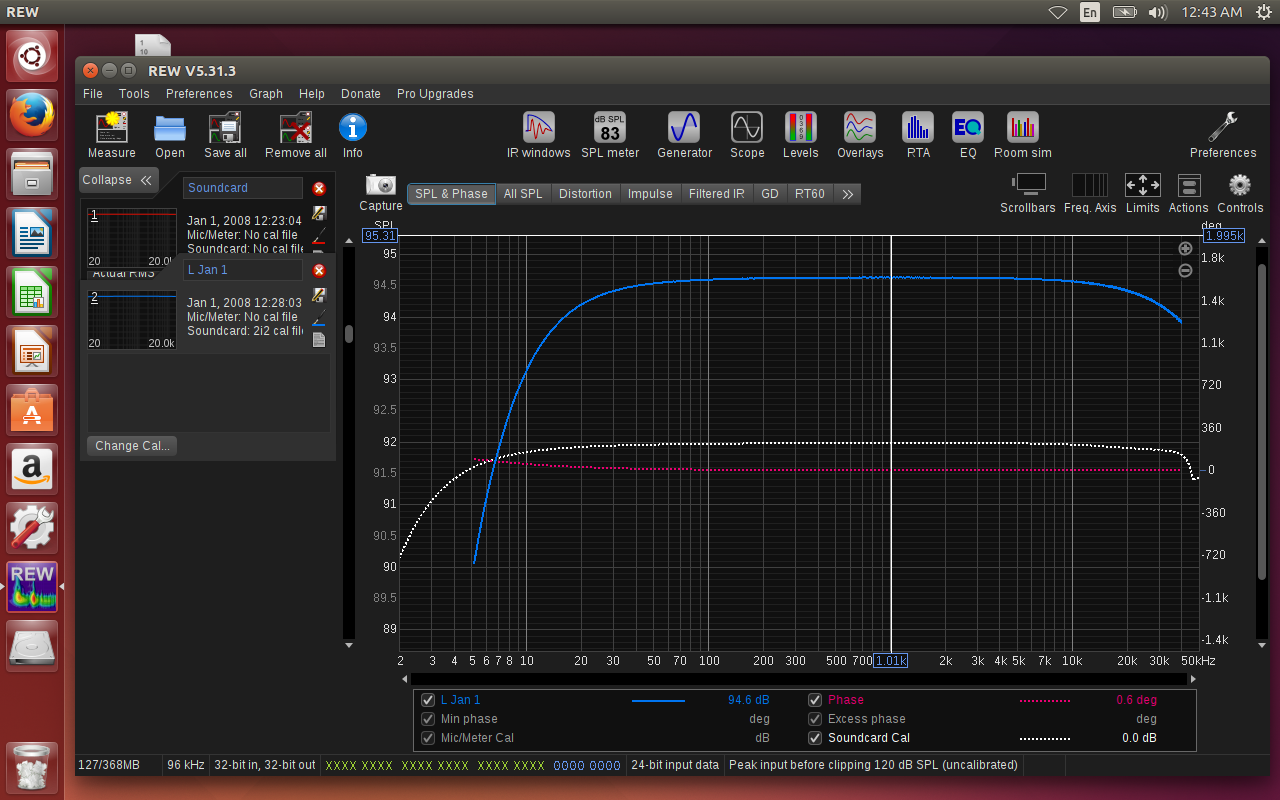
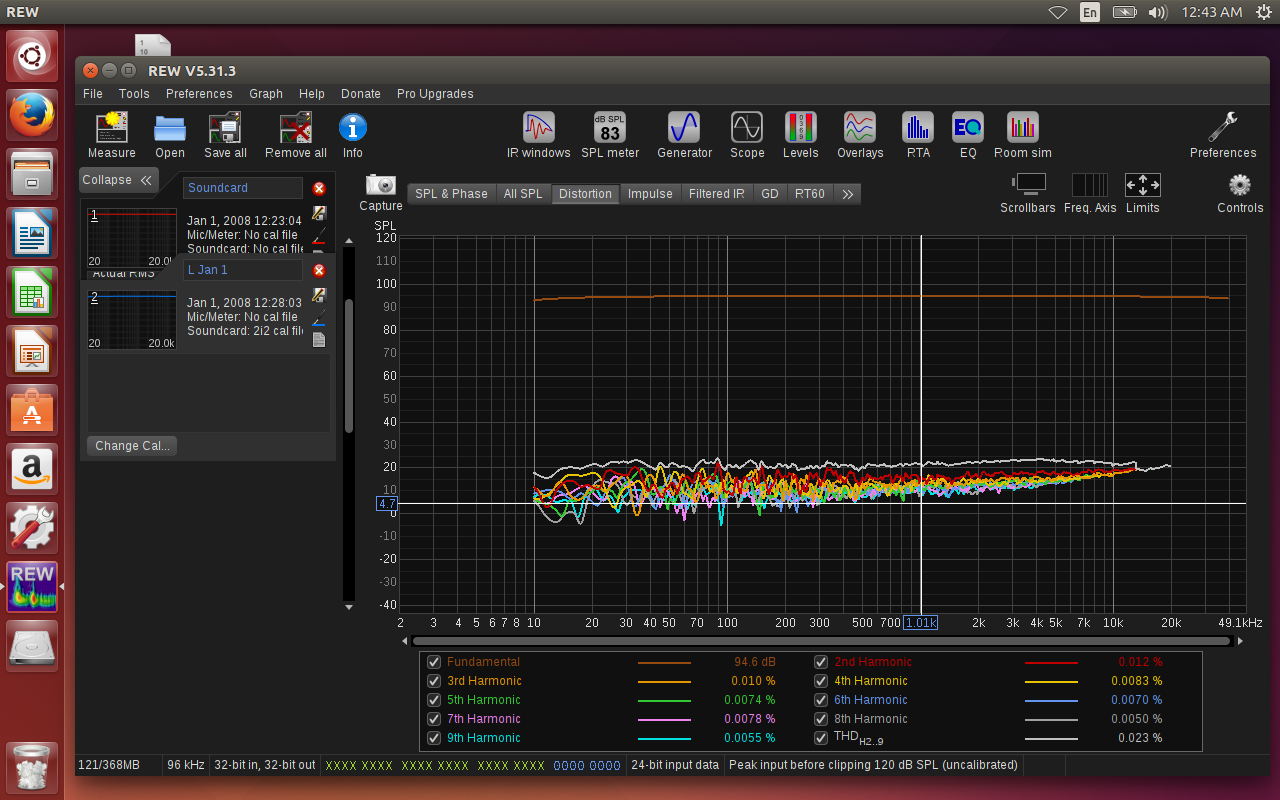
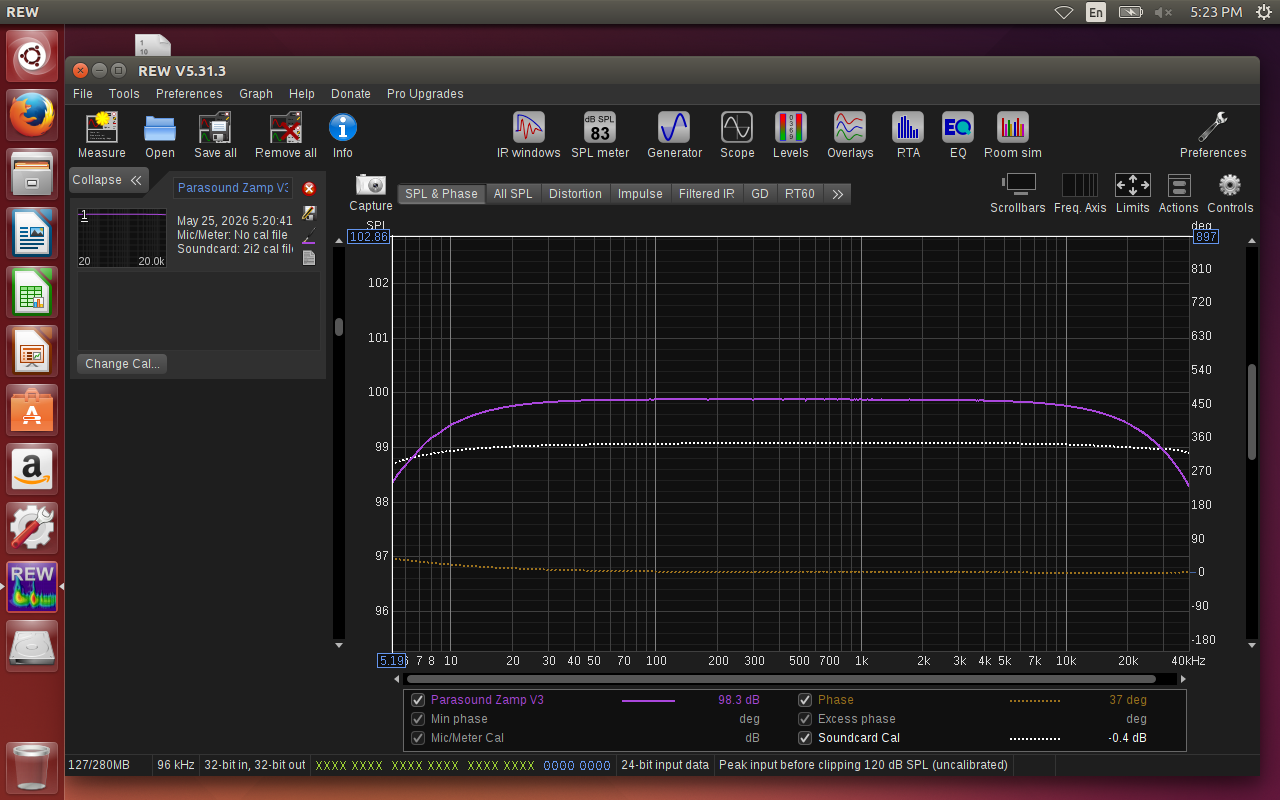
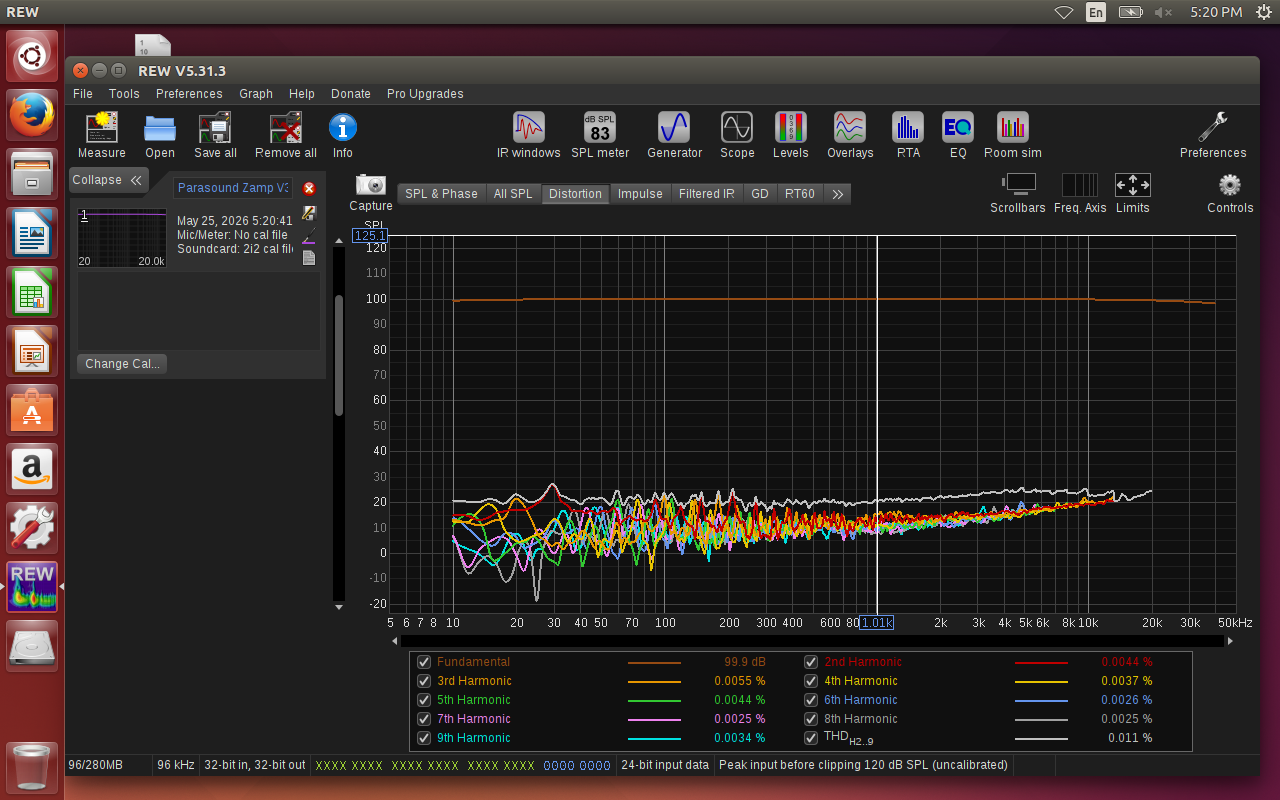
Pic below: Frequency response and distortion test of @CharlieLaub 's old Parasound Vamp V.3 at much less than a 1 watt output. Very low distortion. Down 0.1dB at 20Hz and -0.8dB at 20kHz. (just testing my setup for power amps).
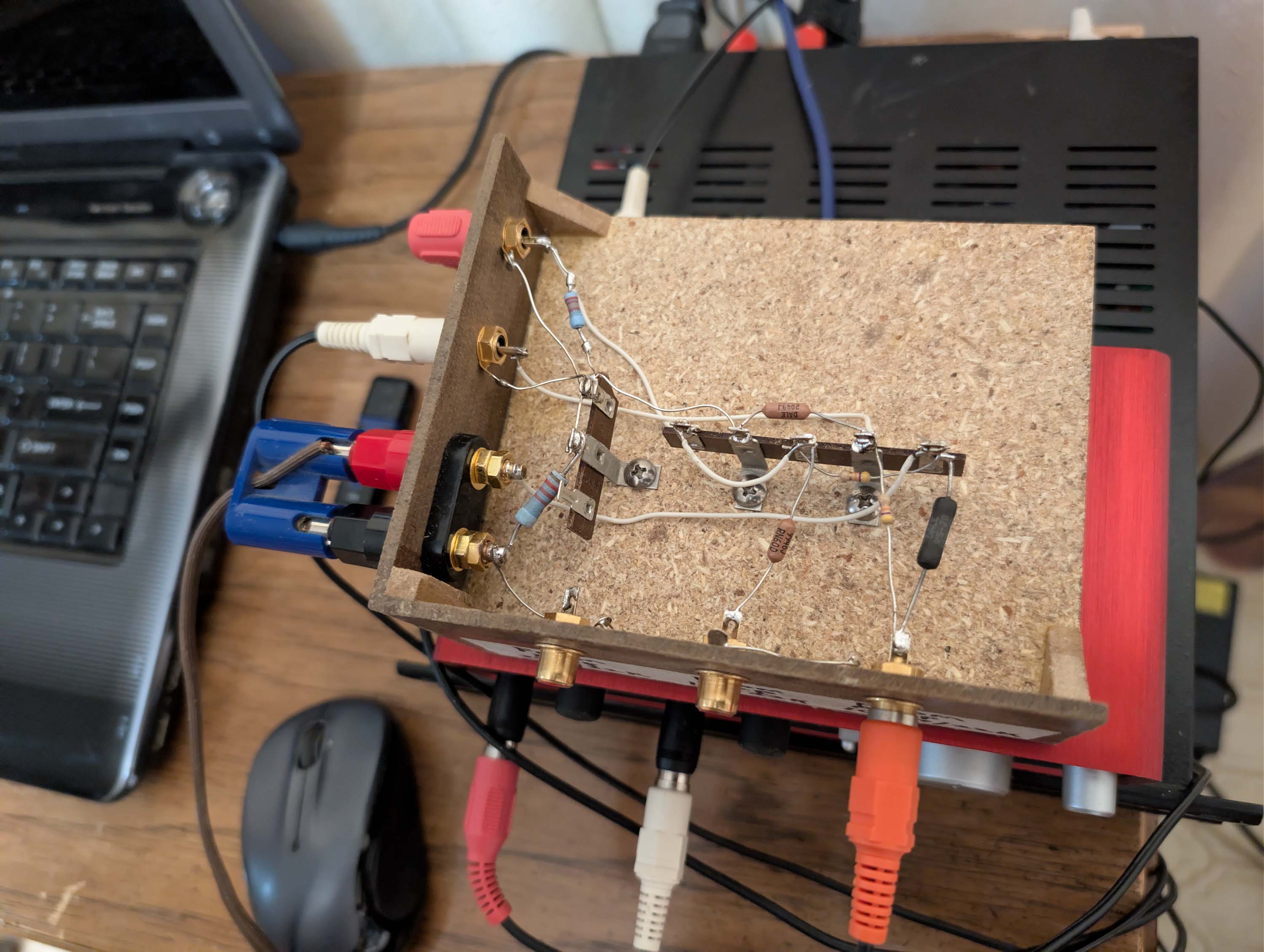
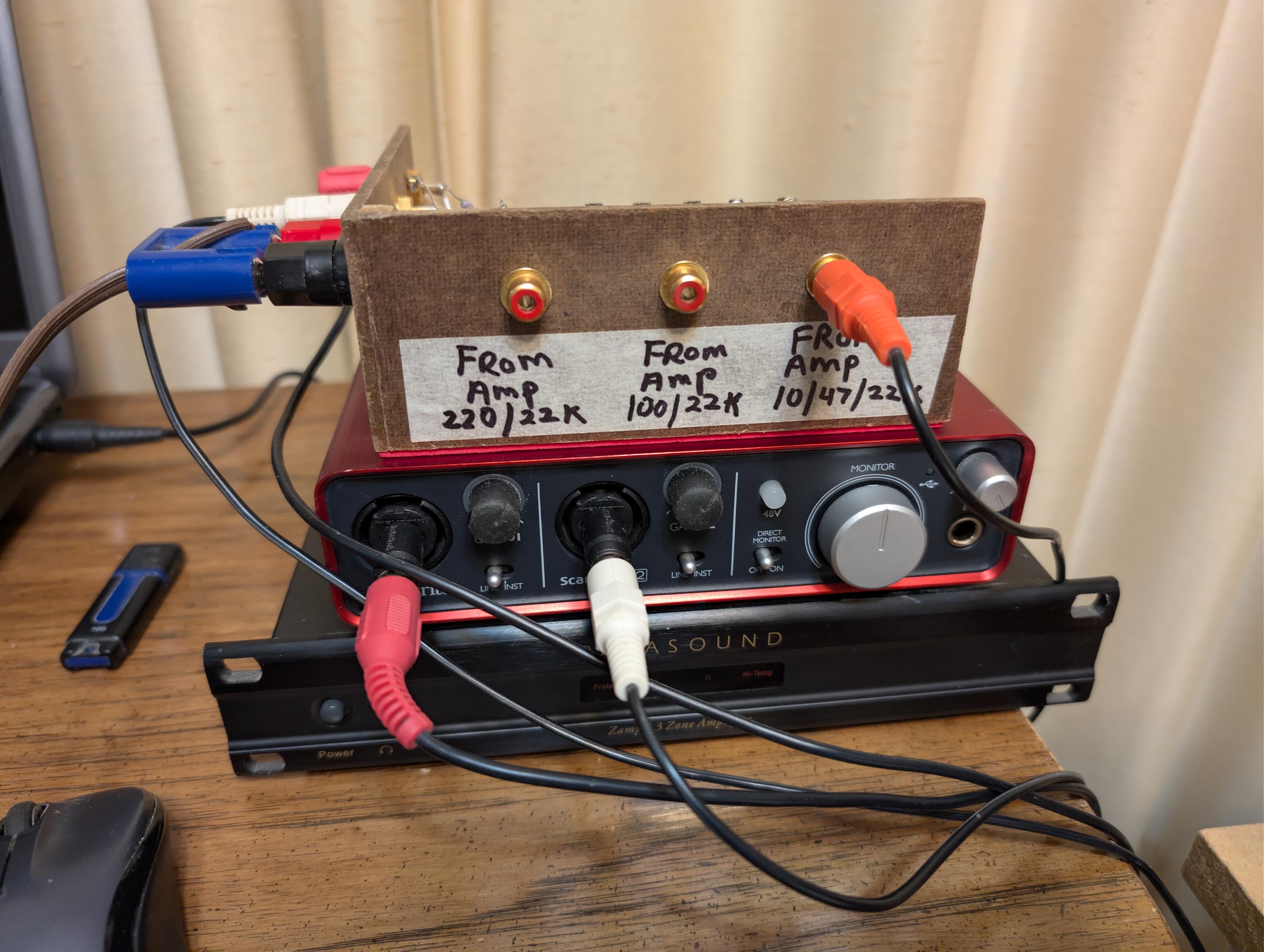
Pic below: Front view of ARTA jig, with masking tape/sharpie labels. The right most jack takes the output from the power amp and feeds into the 10 ohm sense resistor and then a 47K/22K attenuator. This jack is used for driver impedance measurements. The center RCA jack goes into a 100K/22K attenuator and the left RAC jack will go to a 220K/22K attenuator. The plan is to use these two jacks for testing power amps at higher power levels.
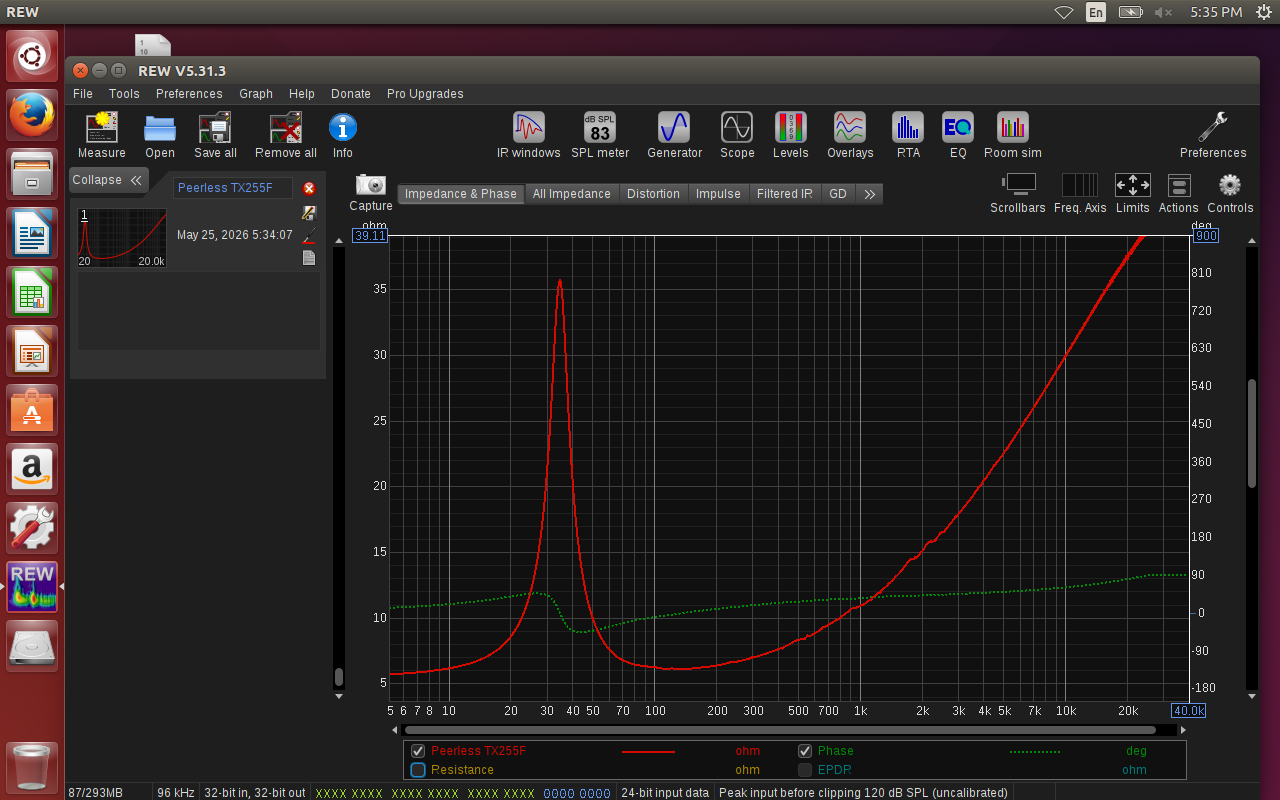
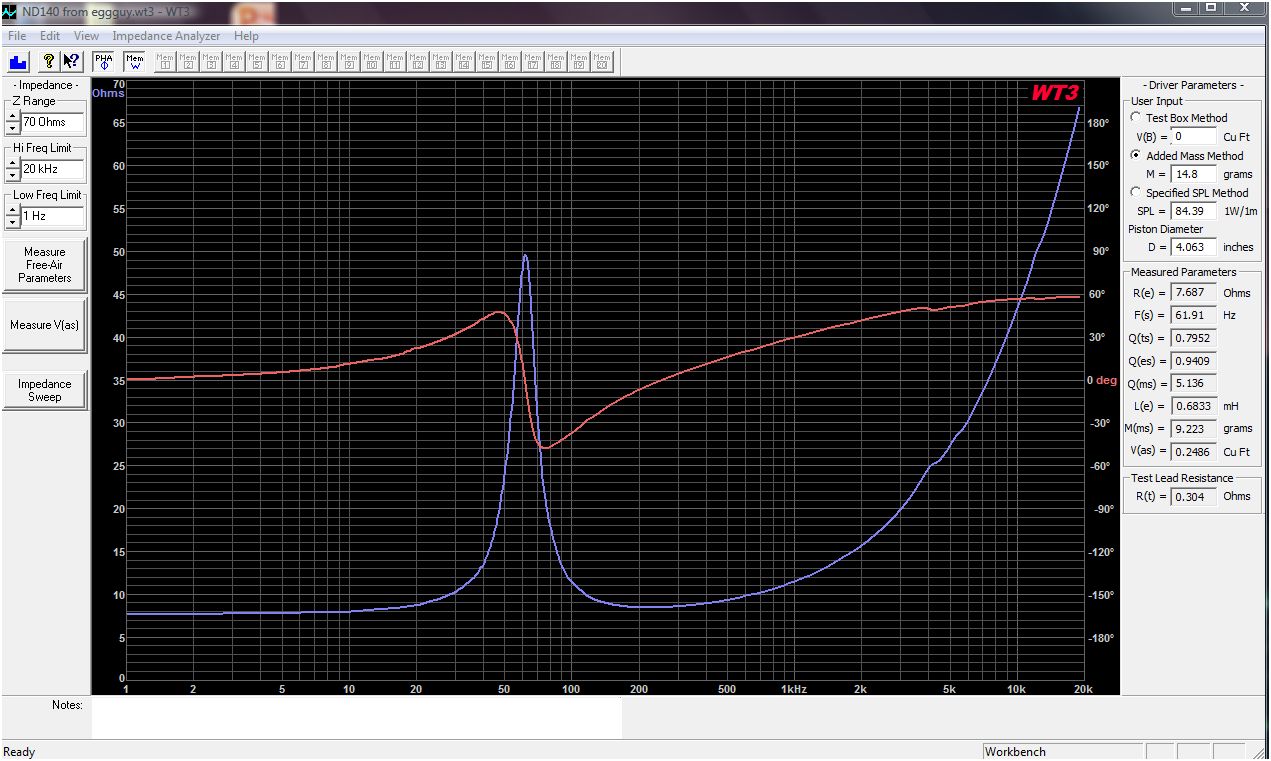
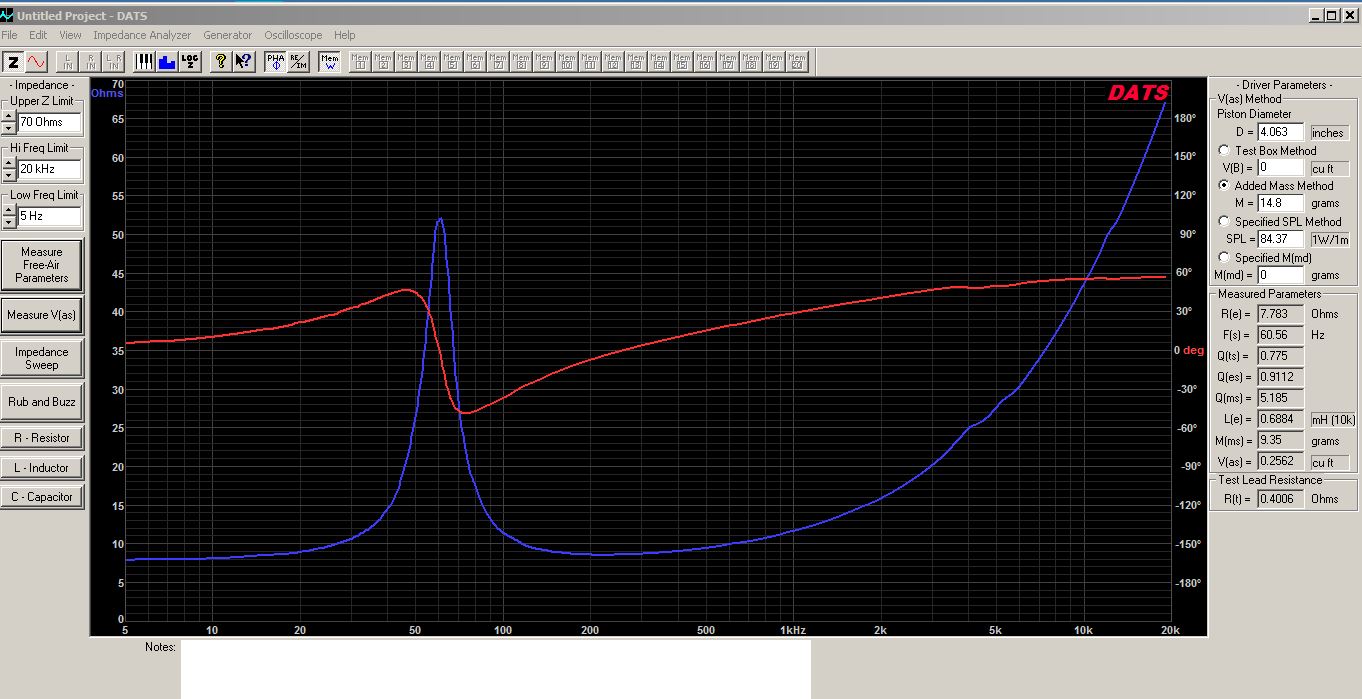
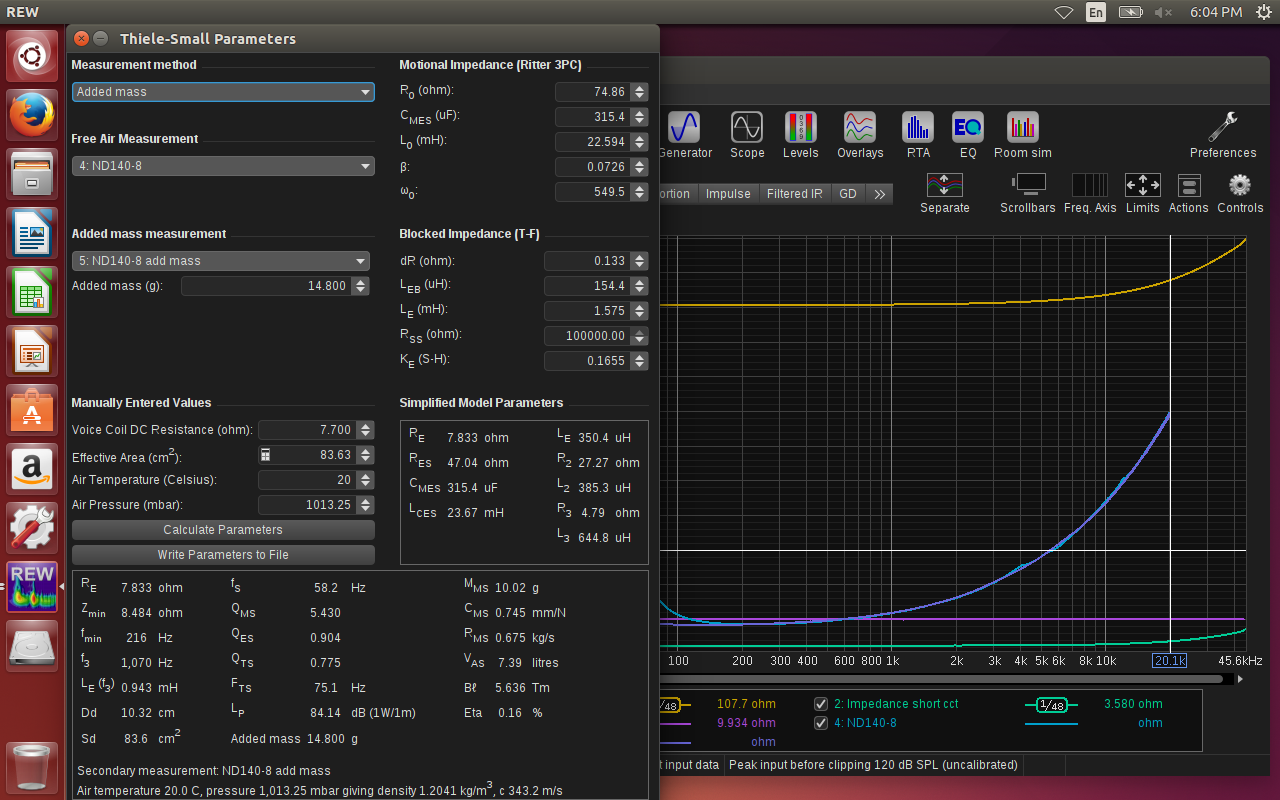
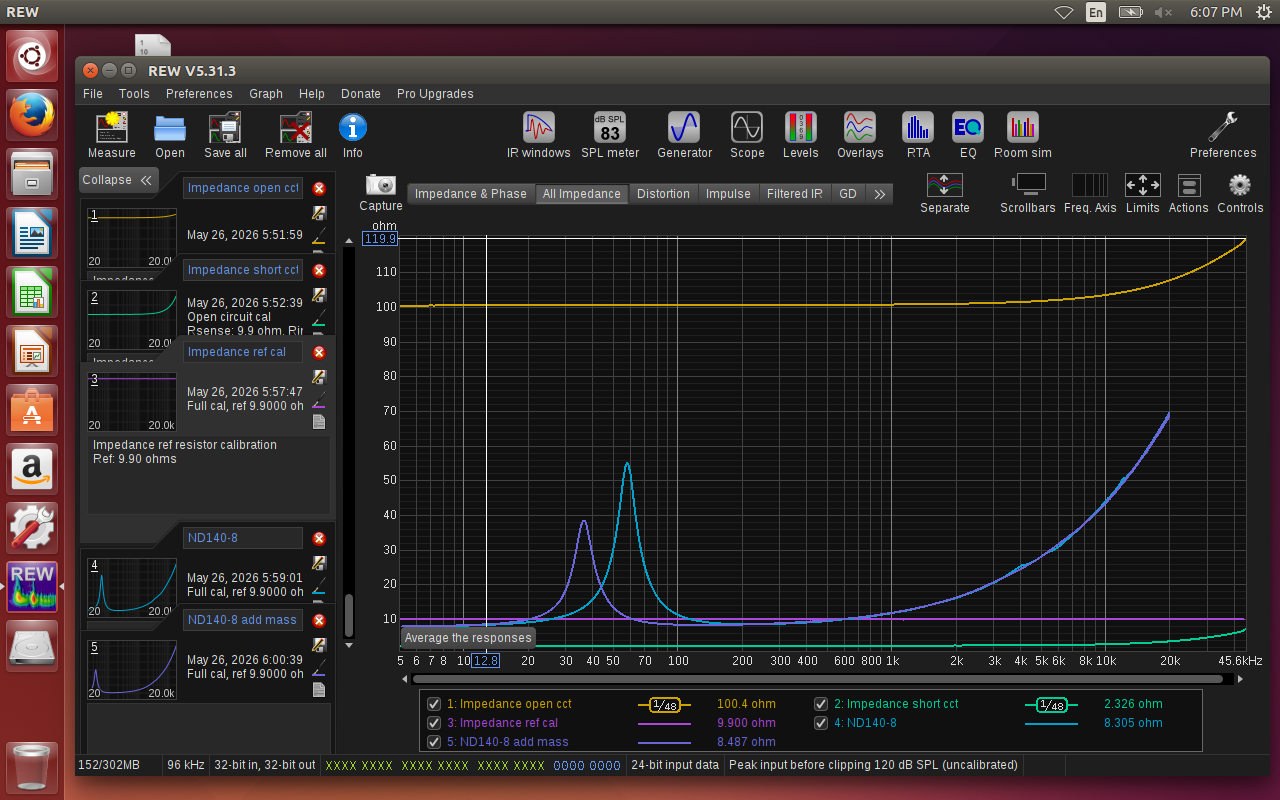
As a sanity check, I did a comparison of T/S parameters generated by three different setups: 1) REW 5.31.3 running on Linux Ubuntu, 2) DATS V2 running on Win 7, and 3) WT3 running on Windows Vista. Driver under test was a slightly used Dayton ND140-8 from Eggguy. All measurements were fully calibrated according to instructions. I used the added mass method: 14.8 grams. Piston diameter: 4.0625 inches. REW sense resistor: 11.1 - 1.2 lead resistance = 9.9 ohms. REW Re entry: 8.9 - 1.2 lead resistance = 7.7 ohms. Let me know if you see any mistakes in my REW calibration screenshots below. Data looks reasonable to me. I think my REW/Ubuntu/ARTA jig test setup is good to go.
Ani, yes and no. Sorry for the long, convoluted answer, but I’m in the process of moving to a dual location, dual boot type measurement setup. I re-partitioned the hard drive on Dan’s old laptop into two equal sections so that it will boot into either Linux Ubuntu or Windows Vista. This laptop, located next to my electronics test bench, will not have a microphone input for measruing driver SPL. It will only be used to test preamps, power amps, and raw driver TS parameters with REW + Scarlett 2i2 + ARTA jig when booted into the Linux HD partition. If I boot into the Windows Vista partition, I can still run the old WT3 woofer tester (which still works with my old WT3 hardware) or I can run the old Jeff Bagby spreadsheet programs. It is a great setup and seems to be working very well at this point (fingers crossed!). I added the ability to test driver T/S parameters because I often break in new drivers on my test bench, so now I can test T/S parameters before and after break ins.
My other laptop is located off to the side of the room where I test loudspeakers with either OmniMic or my dual channel Sonarworks XLR mic + UR22 + Win7 laptop setup. I currently capture FR measurements with Soundeasy, but I can also switch over to REW or ARTA on this same Win7 laptop to do the capture. I can also test driver or finished speaker impedance with DATS V2 running on my Win7 laptop.
For the past few years, I have been doing box design and crossover design on my Win7 laptop using WinISD and VituixCAD. That will not change.
thanks Bill! Since ARTA is NLA and i never got around to getting the license while they were around, what is the status now? what are you using for getting distortion measurements - i guess that was what i was using arta and the limp jig.
My understanding is that ARTA would be for frequency response and spectrum analysis. LIMP would be good for impedance curves. And STEPS would be good for total harmonic distortion measurements. I have used both ARTA and LIMP but have not used STEPS. From what I can tell by reading the help file, STEPS does not break THD out by order. REW can break distortion out to the 9th harmonic.
IIRC STEPS uses the stepped sine method which is potentially more accurate and has a lower noise floor, but doesn’t/can’t break out the individual harmonics. In REW you can use the sweep method which shows the individual harmonics or the stepped sine method (in the RTA window).
Bill – I’ve mentioned this before, but maybe it’s worth repeating. You can run Jeff’s old programs on Windows 11 if you can load a 32 bit version of Office on it. Microsoft says you shouldn’t load multiple versions of Office on Windows, but I’ve done it on my Windows 11 laptop: I have a 32 bit version of Office 2010 and the 64 bit version of Office 2021.
Both are on my taskbar, fortunately they use different taskbar icons. I use the 2010 Excel to run all of Jeff’s older programs and some even older ones from the old FRC group. The 2021 version is used for everything else. The only glitch is the taskbar’s most recently used list (right click on the taskbar icon) doesn’t work on 2010 version. Easy workaround is to just open 2010 and use its Recent list. The most recently used list does work for the 2021 version.
PS – Being an old fart I refuse to transition to the subscription version of Office.
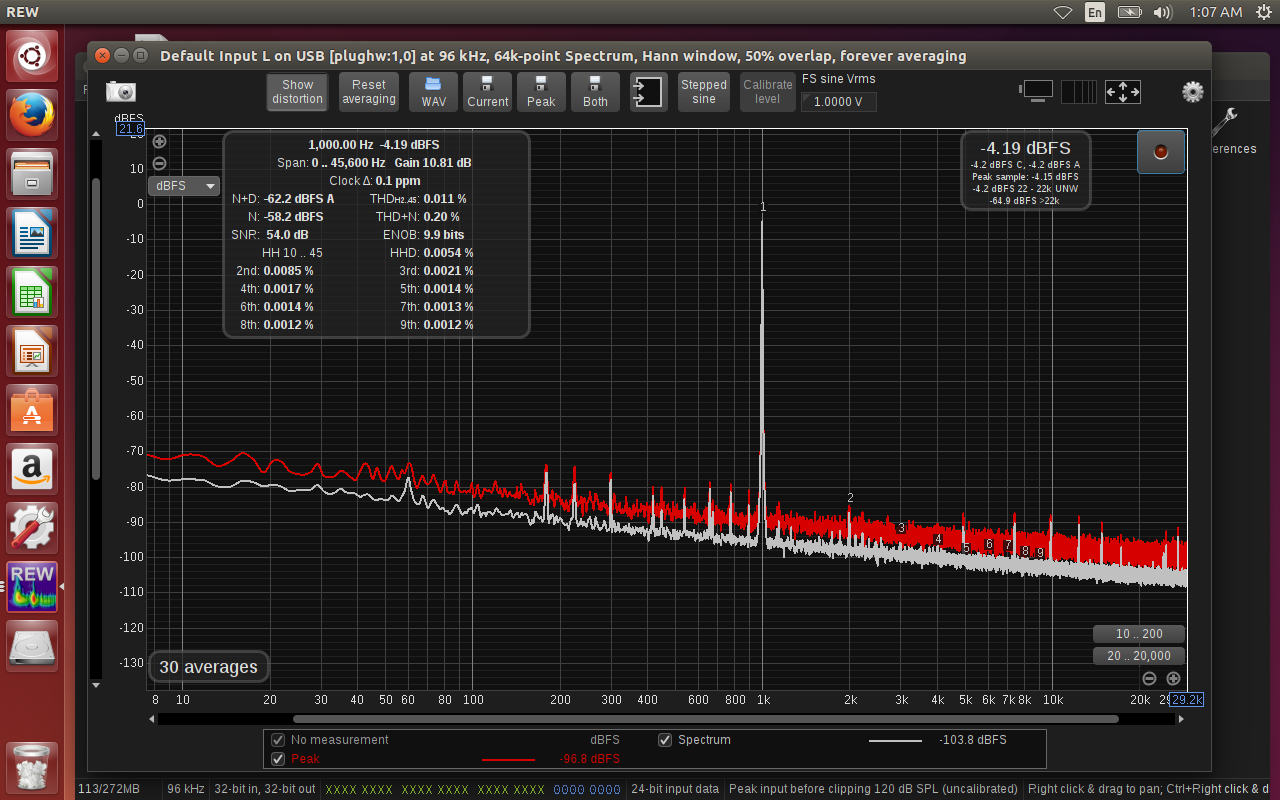
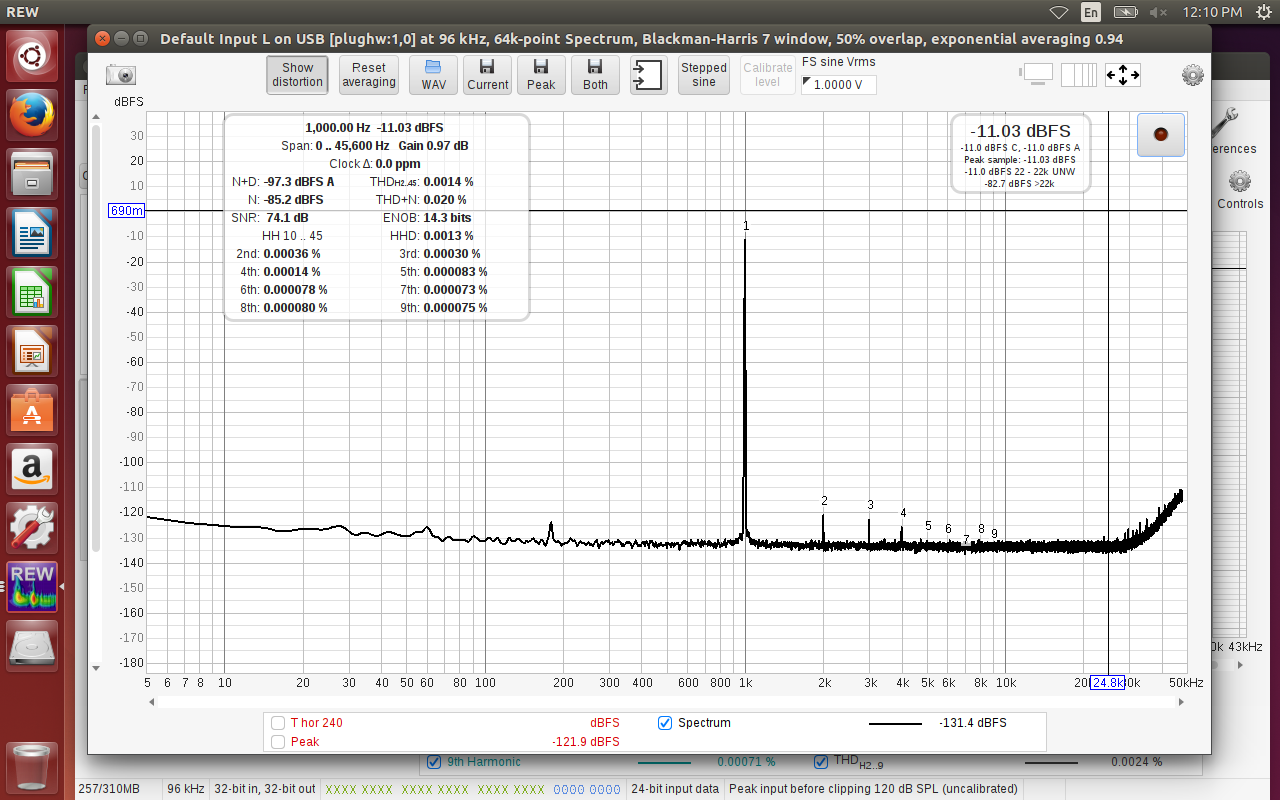
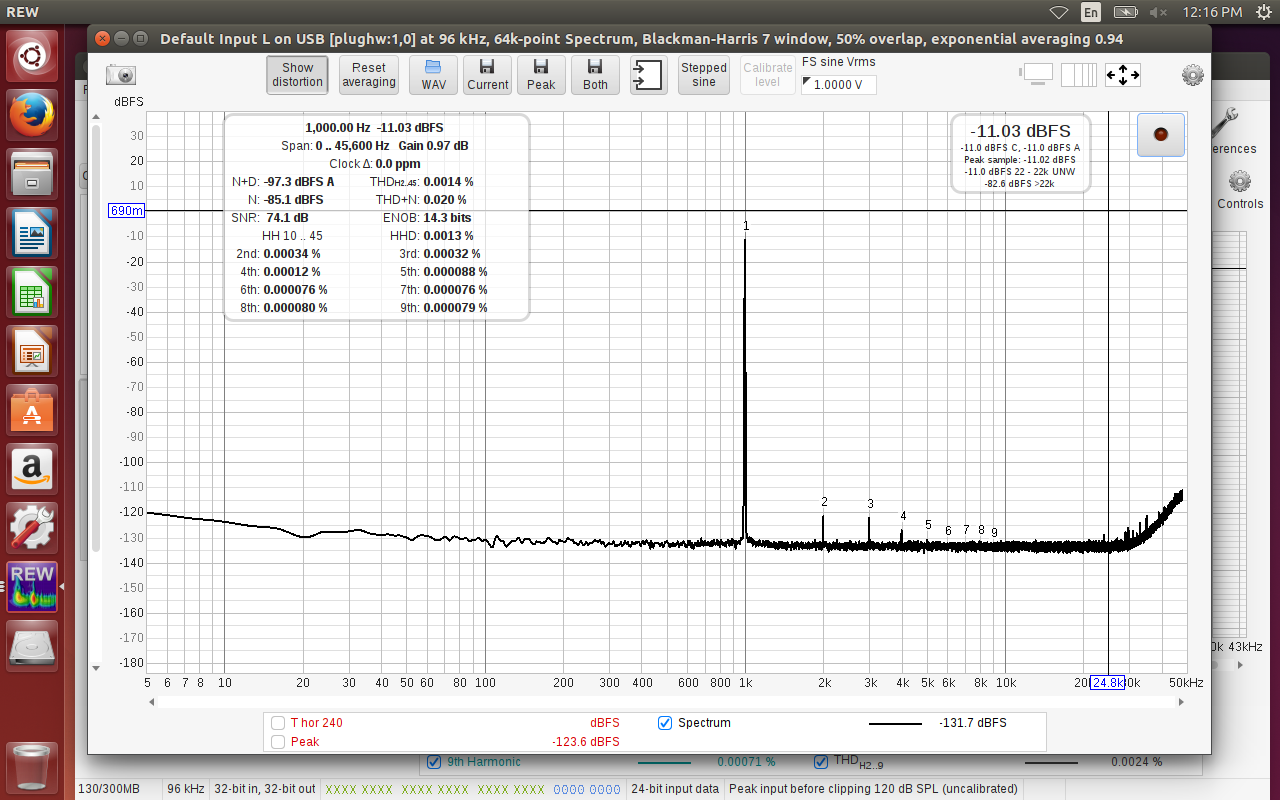
To establish a base level, I ran a simple loopback test with the Scarlett 2i2’s L line input connected directly to the 2i2’s L line output using a shielded TRS cable. 2i2’s monitor volume was set to maximum and the input gain was set for -11dBFS (green leds, no input clipping). It is amazing how sensitive this setup is to outside noise pickup. The 2i2 was sitting directly on top of the power amp for the 1st graph. Laptop was running on AC for both tests, but the laptop power supply was on the floor, about two feet away from the 2i2. Only difference between the two graphs below is that I lifted the Scarlett 2i2 up 1.75" above the power amp for the 2nd graph.
Graph below: 2i2 sitting directly on top of Parasound power amp. The amp was turned off, but note the small glitches at 60 and 180Hz caused by the power amps standby current.
Graph below: 2i2 sitting on a spacer to raise the 2i2 approximatley 1.75" above the power amp. Power amp was off, but still in standby mode. But glitches at 60 and 180Hz are now gone.
Here is a link to the long diyaudio thread showing lots of loopback tests and problems. Based on this thread and my own personal testing so far, my plan is to properly shield my cables with the differential technique mentioned in this thread and then mount everything in a steel enclosure.
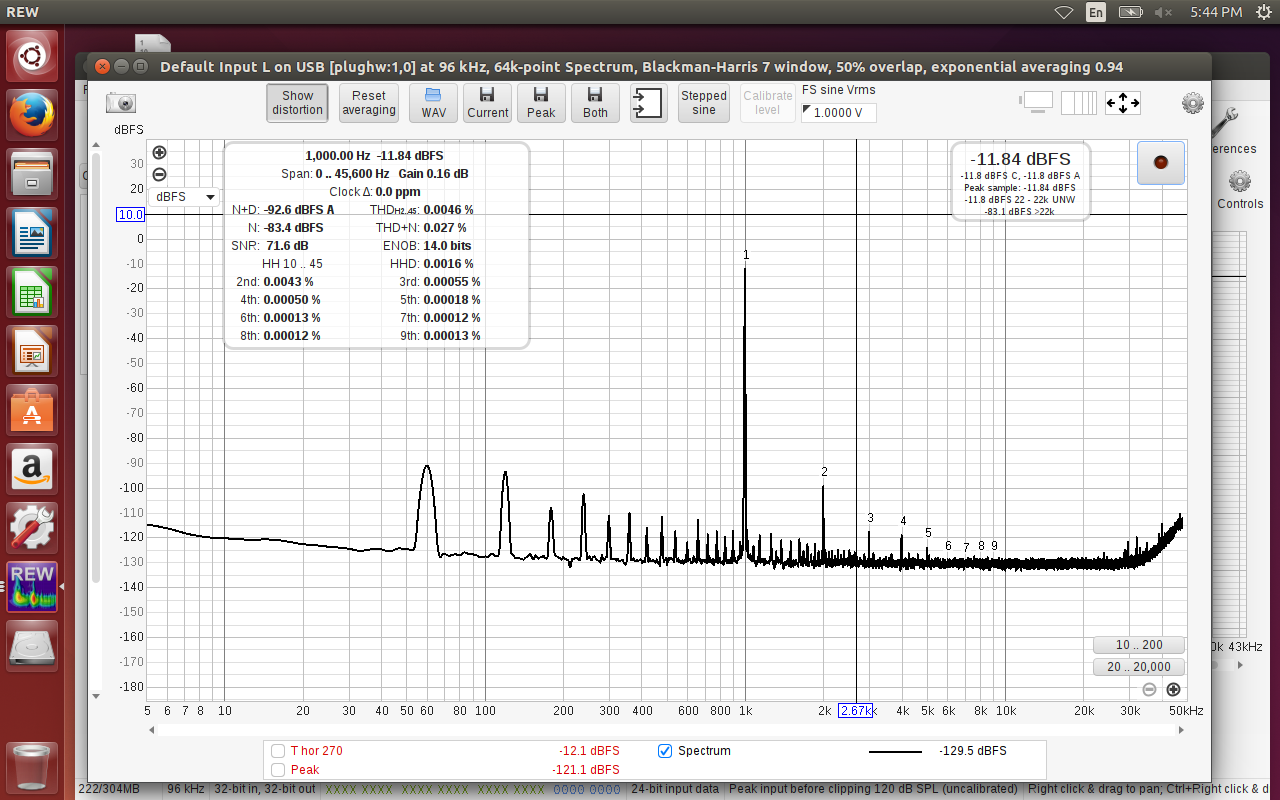
Agreed. I did another loopback test, replacing the higher quality, balanced TRS cables , with one of my cheapy RCA cables from input to output. I used a pair of TS to RCA adapter plugs to complete the connections. As you can see, noise levels increased significantly.