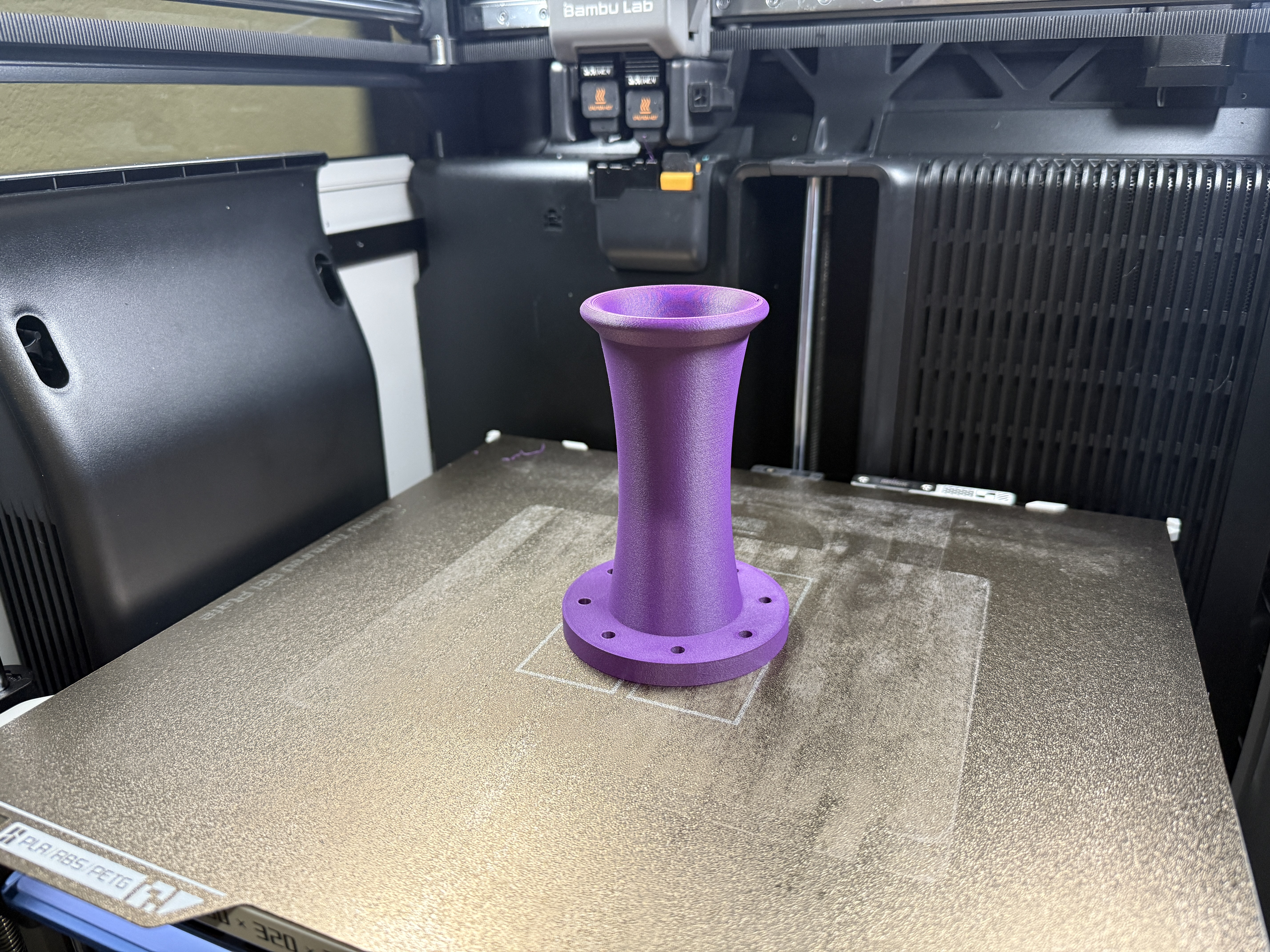
A gift for many? The Mechano23

I’ve been thinking of making a set of gift speakers for a while now, something I could give to friends and family that wouldn’t break the bank and was reasonably simple to manufacture quickly. In lieu of designing something for myself I think I have settled on the Mechano23, designed by Xmachinik. His website is linked below, as is the thread at ASR where it is well documented and discussed (and where I first discovered the design) and Amir’s review of the design using his fancy gear.

Xmachinik Website
AudioScienceReview Post
AudioScienceReview Review by Amir

This speaker uses the affordably priced Scan Speak H2606/920000 tweeter ($47.80 at the time of this writing) and the even more affordably priced SB Acoustics SB13PFCR25-04 midwoofer ($36.80) in a roughly 8 liter box. Just under $170 USD (plus tax and such) is pretty darn solid for drivers these days, and with all the positive reviews from the various websites and users it was hard for me to ignore. I had originally pushed this project off with a reminder to look at it closer toward Christmas, but I came across a project on Makerworld that reminded me of it a bit sooner than expected.

Mechano-23-CS on Markerworld

This project was posted by user_1168315211 (no other identifier that I could find, but I wanted to be sure to call out their work) and appears to be intended for experienced builders and those new to DIY. The model is split into several parts: the woofer portion, tweeter portion, crossover boards, and port (which could be modified for various tuning). This was also seemingly intended for a variety of 3D printers with the woofer and tweeter portions split as they were. There was some effort to stiffen up the sides of the cabinet by adding some vertical ribs as well, though this is also a function of the infill density and wall loops, among other things that can be adjusted within the slicer software. I went ahead and printed one cabinet to see how it looked.
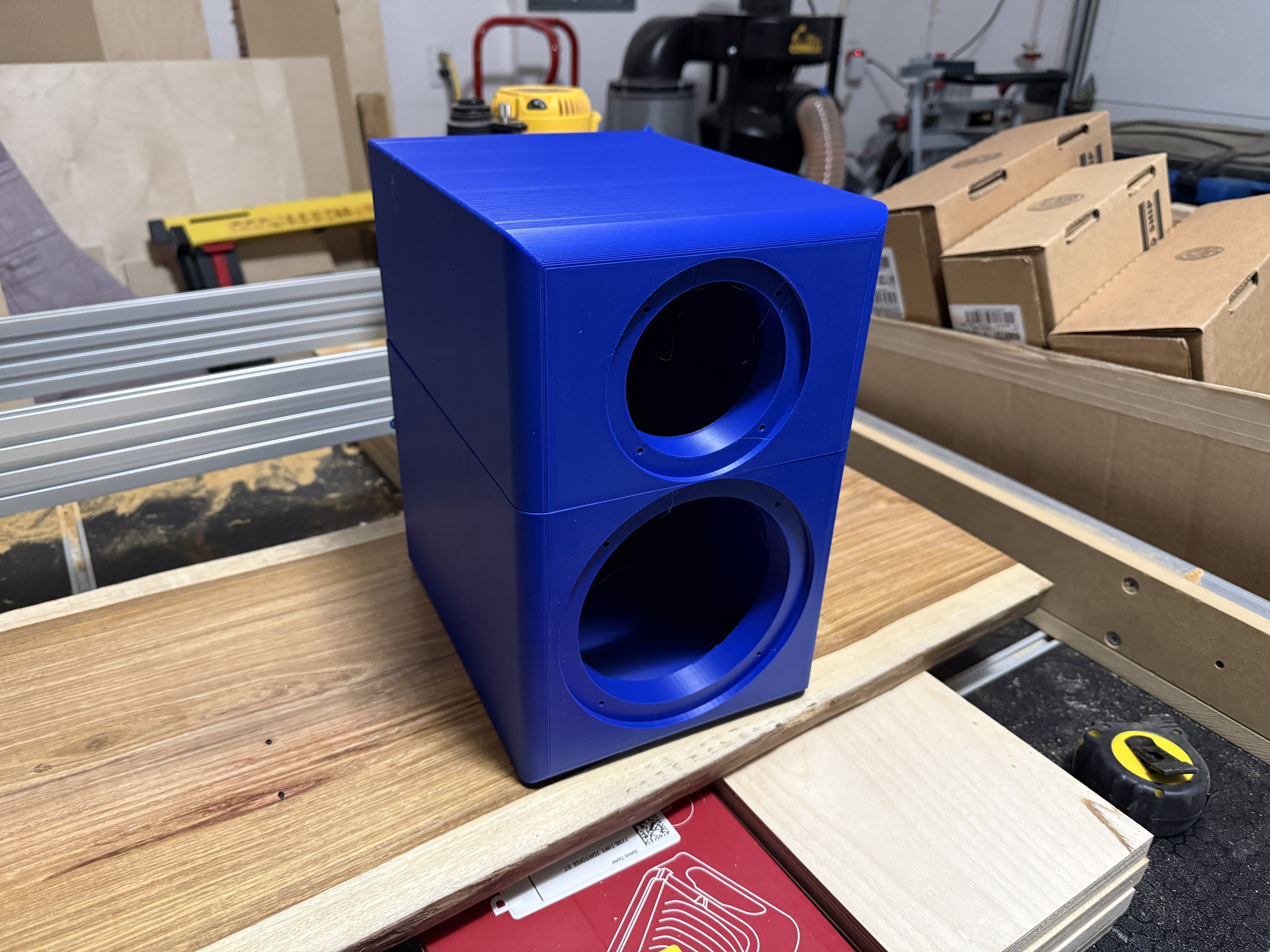
I noticed a few things about the build that I felt required a little attention, the most obvious one (to me) being the portions that would be adhered to each other could have a means of holding everything aligned during that process, but there were a few other small details I felt I could help with. I reached out to the original CAD / Slicer model but didn’t receive a response, so I decided to recreate it myself. I’m not sure I’ll share the files on Makerworld, but we’ll see. I’m also not sure I’ll ‘only’ make the Mechano23 with a printer but I figured I’d give it a go.

I had a few goals with this design.

  1. First, the largest dimension is only 290mm, meaning it’ll fit on my printer - I won’t need to do a split cabinet design. However, there will still be a few separate pieces by necessity. The seams should be more natural though.

  2. I want to minimize to the maximum extent possible the number of supports that need to be printed. I’m just not a fan of them and they can often be engineered out in designs such as this.

  3. Glue should not be necessary.

  4. Baffle and rear will be printed separately and bolted on.

  5. The outer cabinet (sides and top) will be printed in one piece. The major downside here is the print time could be several days and use two or more rolls of filament per side. That’s a long time for something to go wrong. Hard to avoid this.

  6. Threaded heatset inserts will be used extensively.

  7. Gaskets will also be printed from TPU (or, perhaps, cut from neoprene using the printer)

  8. Braces will be integral to the design (and also printed).

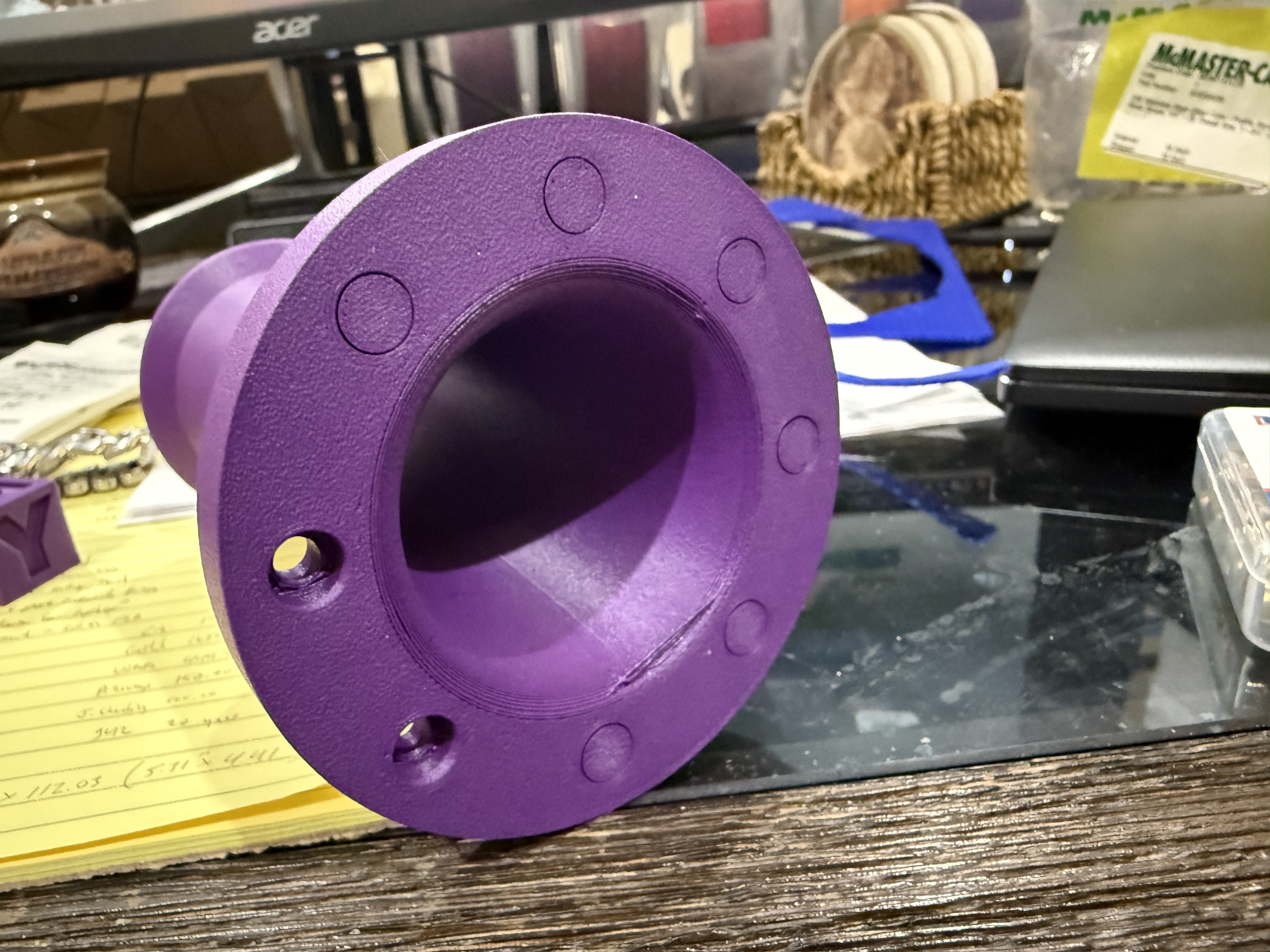
My first intent is to create some ‘shells’ to prototype the models. This one I printed at 25% infill (i.e. not just a shell, which might just be 5%) with PETG-CF (carbon fiber) so it’s really quite solid. I think in an ideal world I’d use CF for all parts but the available colors aren’t going to work for every situation. I want to test this with regular PETG to see how much difference that might make. A couple key notes about the below baffle compared to the speaker design by Xmechanik and the original model on Makerworld:

  1. The original baffle (in addition to all other sides) called for 18mm of Baltic birch. Obviously this is a great starting point for a small speaker! However, I’m working with plastic here and the material will probably be ~75% air in the finished model. I felt I needed to go thicker to shore up the strength a bit, so I elected to go with 36mm. This will also increase the interior volume a little, which I’ll need later due to additional bracing.

  2. I couldn’t tell if the original design called for carving out the back of the baffle around the woofer. The 3D printed version did not. I have included this in my redesign.

  3. The original design has no chamfer or roundover on the edges of the baffle. Given how well it measures and the reception it has received I guess this works just fine. However, that seems kinda boring to me, and it must have to the 3D printed modeler as well since they included a pretty good roundover on the vertical edges. Normally I would do that same, but a 3D printed roundover in which the baffle is constructed from back to front ends up looking a little rough. I think it looks really quite nice with a relatively steep chamfer instead, which I placed on all four edges.

  4. This baffle is held on by eight 1/4-20 bolts. Six would have been fine, but I decided having 4x arranged around both the tweeter and the woofer would look nice. The current print uses the low profile 316 stainless hex top bolts I have set aside for another project, thinking they would be nice here too. These are expensive, something like $10+ apiece. There will also be eight on the back, so that would be $160+ per side, or in other words, WAY too much for ~$170 worth of drivers total, especially if I’m making multiples. Making the change to 82 degree countersunk hex bolts (still 316 stainless) runs about $1 each for the same size. Still pricey for what amounts to a pretty (but nice) bolt, but FAR more palatable to the wallet. I’ll see if I can find a way to buy some in bulk.

  5. The drivers will be attached with M3 bolts (for the tweeter) and M4 bolts (for the midwoofer). I haven’t priced these yet, but I’m obviously hoping they’ll be cheaper still.
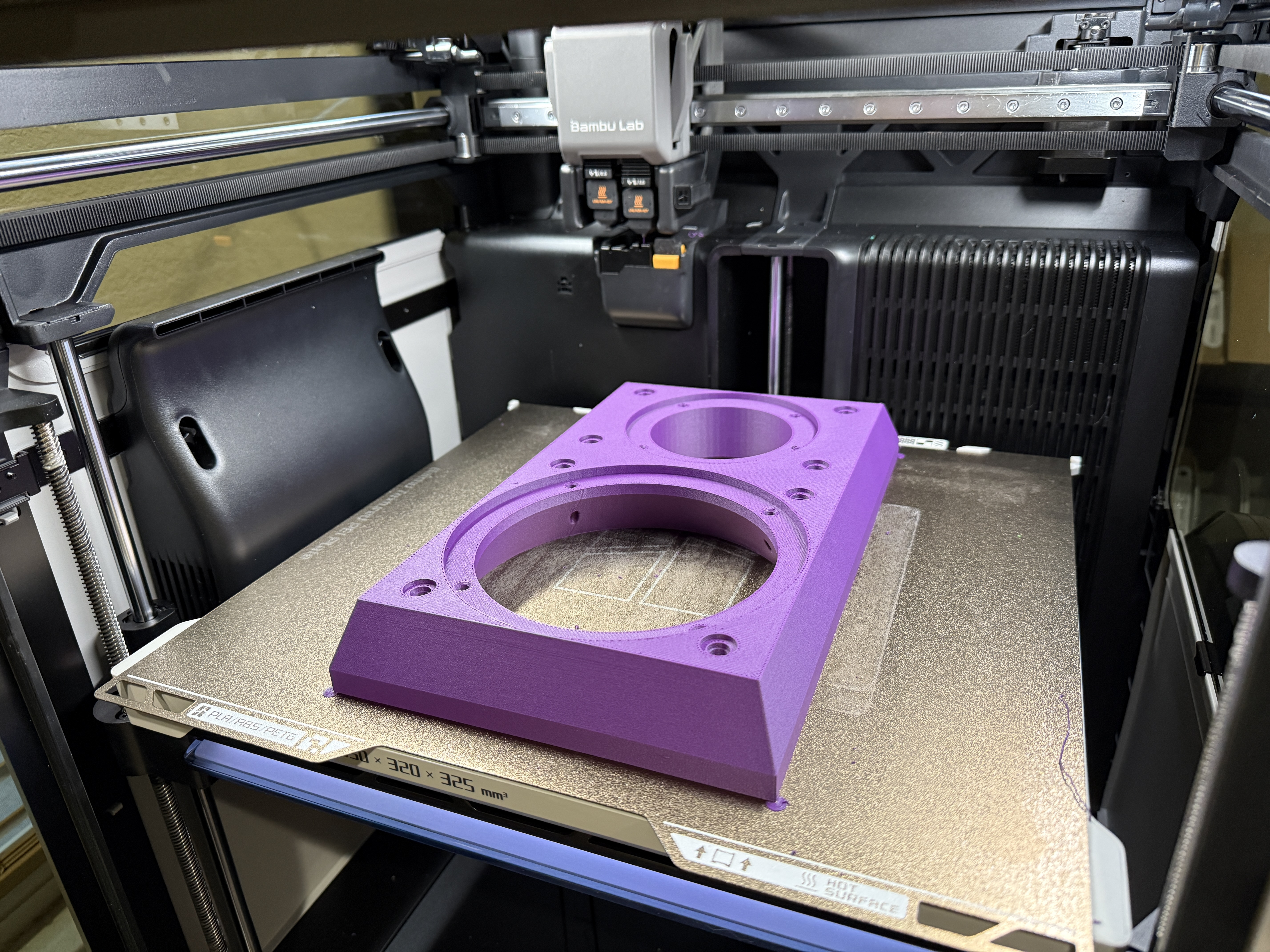
The other side of the baffle is currently flat. I have thought about including guide pins, or a groove for the gasket, or even a groove that might fit a corresponding protrusion of sorts on the cabinet itself. I do not think these are necessary - the bolts will essentially be pins that will aid in alignment. I learned from the AliExpress ‘sub’ box that having a groove on both the cabinet and the baffle is kind of a pain to align and keep in place while clamping down, and I have a groove located on the cabinet already. The current baffle also does not require any supports when printed back to front.
3 Likes

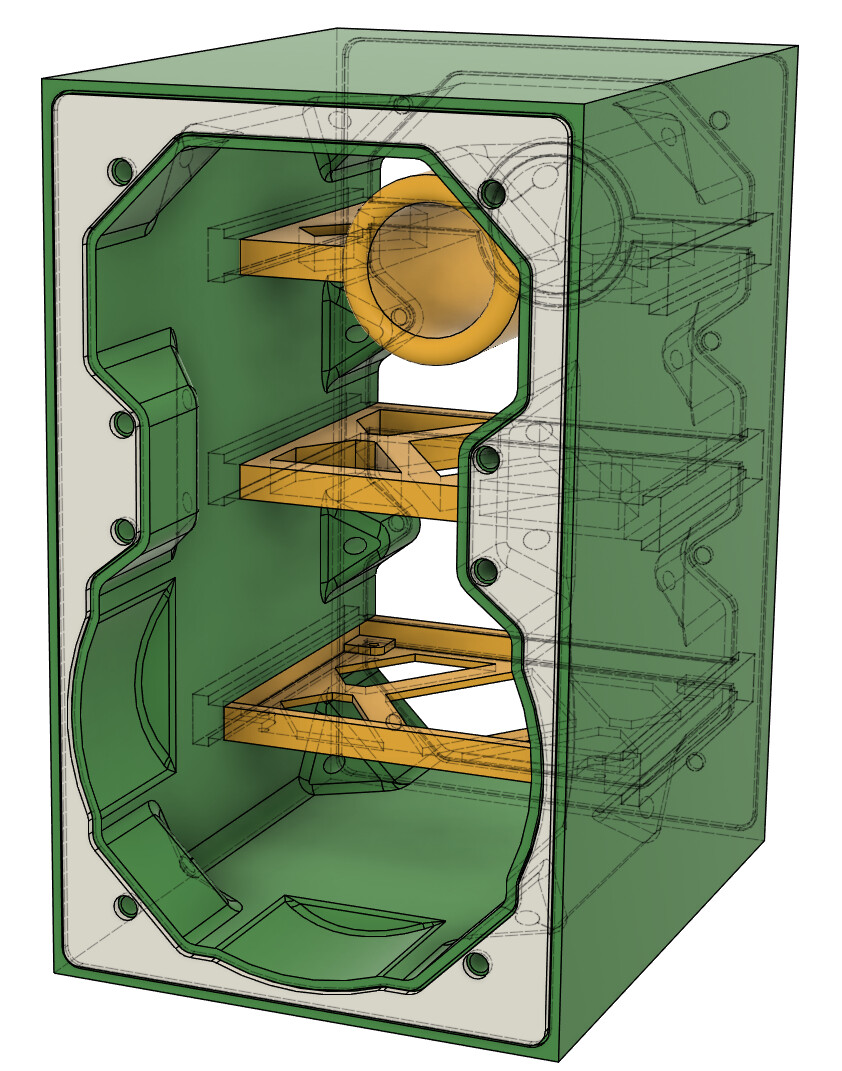
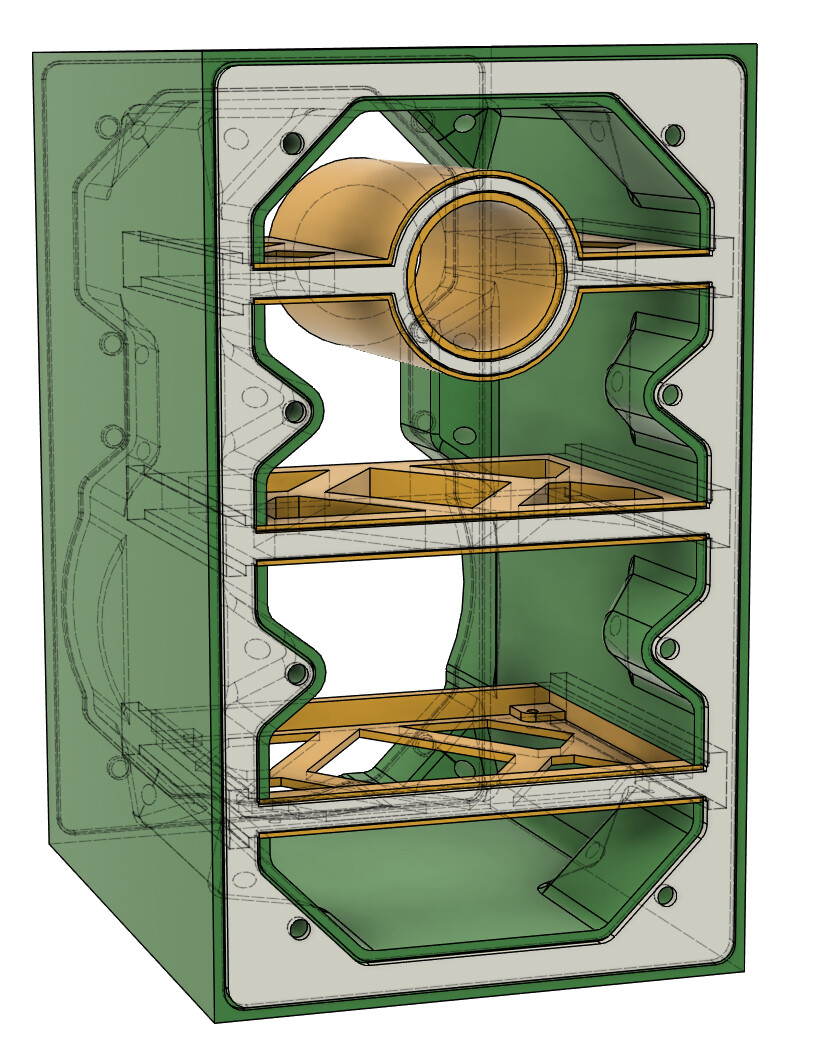
So this is where things started to look a bit more complicated than the print I did from Makerworld. Here are the individual parts shown (or, at least, mostly shown) in the images below, along with a few features.

  1. Cabinet (sides/top/bottom)

    1. Can be printed in one piece with supports only used for one of the grooves. All the angles shown are important in order to make this possible. It could be printed from back to front or front to back, but I’d probably go with the former.

    2. This would be a 3-day print at 25% infill. That’s twice as long as anything I’ve done, but having minimal supports (and in this case, no supports after the first hour or two) really increases the likelihood of success.

    3. This would be a minimum of 2 kg of filament per cabinet.

  2. Top brace/port

    1. 180 degree roundover on the inner port

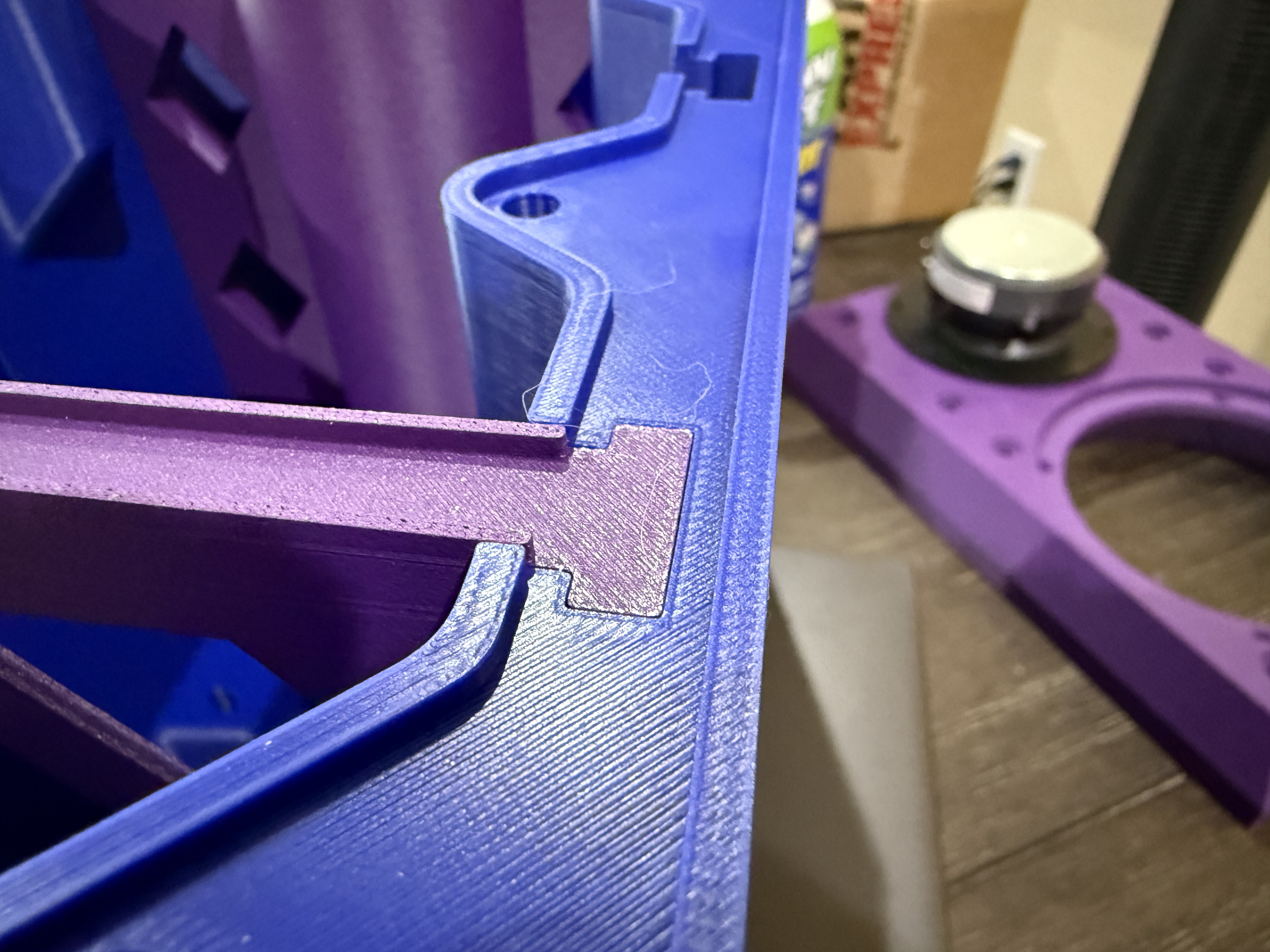
    2. Slides into the cabinet from the back. Unknown how these tolerances are so that’ll be something to watch for

    3. Printed with only a support for the groove in the back for the gasket.

  3. Mid brace

    1. Not much to say here, other than I might make this go closer to the driver yet. Need to measure the tolerances for that.

    2. Slides into the cabinet from the back.

    3. Printed with only a support for the groove in the back. I opted to have the gasket ‘seal’ the braces so there would be contact with the rear. Might help a little with resonances.

  4. Bottom brace/crossover bracket

    1. This is designed around a PCB someone made for the crossover, which I’ll be using (and linking later). This should speed up assembly if I’m making multiples.

    2. Slides into the cabinet from the back.

    3. This might be the smallest piece in terms of filament usage (other than the gaskets) but it’s the most complicated in that it’ll currently need more supports. I am considering a way to print this such that it would need less. That would entail changing the way it attaches on the sides and I’m not sure I want to do that.

  5. Baffle gasket

    1. Pretty straightforward, but one thing (that should have been obvious) I learned from the AliExpress subwoofer cabinet is you don’t make the gasket the same size as the groove. It fit on one side with some effort, but there was no chance it would go into the corresponding slot on the baffle. This time, I made the gasket a little smaller than the groove so it’ll easily fit. It’s 3mm thick with a 2mm deep groove too, which is a bit thinner that I had used previously as I observed little compression. This’ll be trial and error as well to get right.
  6. Rear gasket

    1. No notes here, same thought process as stated in previous bullets.

So here’s the question then: Is there anything obvious I’m missing from the design so far?

Other than the entirety of the back, of course!

4 Likes

Dude, that’s freaking stellar​:smiling_face_with_sunglasses::sign_of_the_horns:t3:

1 Like

Thank you! I should point out part of the rationale for this is to create something that could also be partially printed, partially wood. In this case, primarily the front and back being wood, should the desired style call for it.

2 Likes

With it being a printed cab, maybe utilize the OptiPort that STV over at DIYAudio has designed.

This is interesting! I had read about this a while back and had forgotten about it as I don’t frequent that forum particularly often.

Something else that I was thinking about - but I’m not certain I can even do with the free version of Fusion360 - is adding texture to all interior surfaces, including the port. Like a golf ball of sorts. I don’t know if this would have an audible impact but it is certainly something unique that a 3D printer can make trivial. If I can figure out how to model it, of course!

STV tried that to the port, no gain. Might have actually made it worse due to turbulence, you want nice laminar flow.

1 Like

Just throwing this in here in case anyone missed it. Naturlyd at DIYAudio made a neat little website for playing with this in place of using Fusion360.

Optimal Port Designer

2 Likes

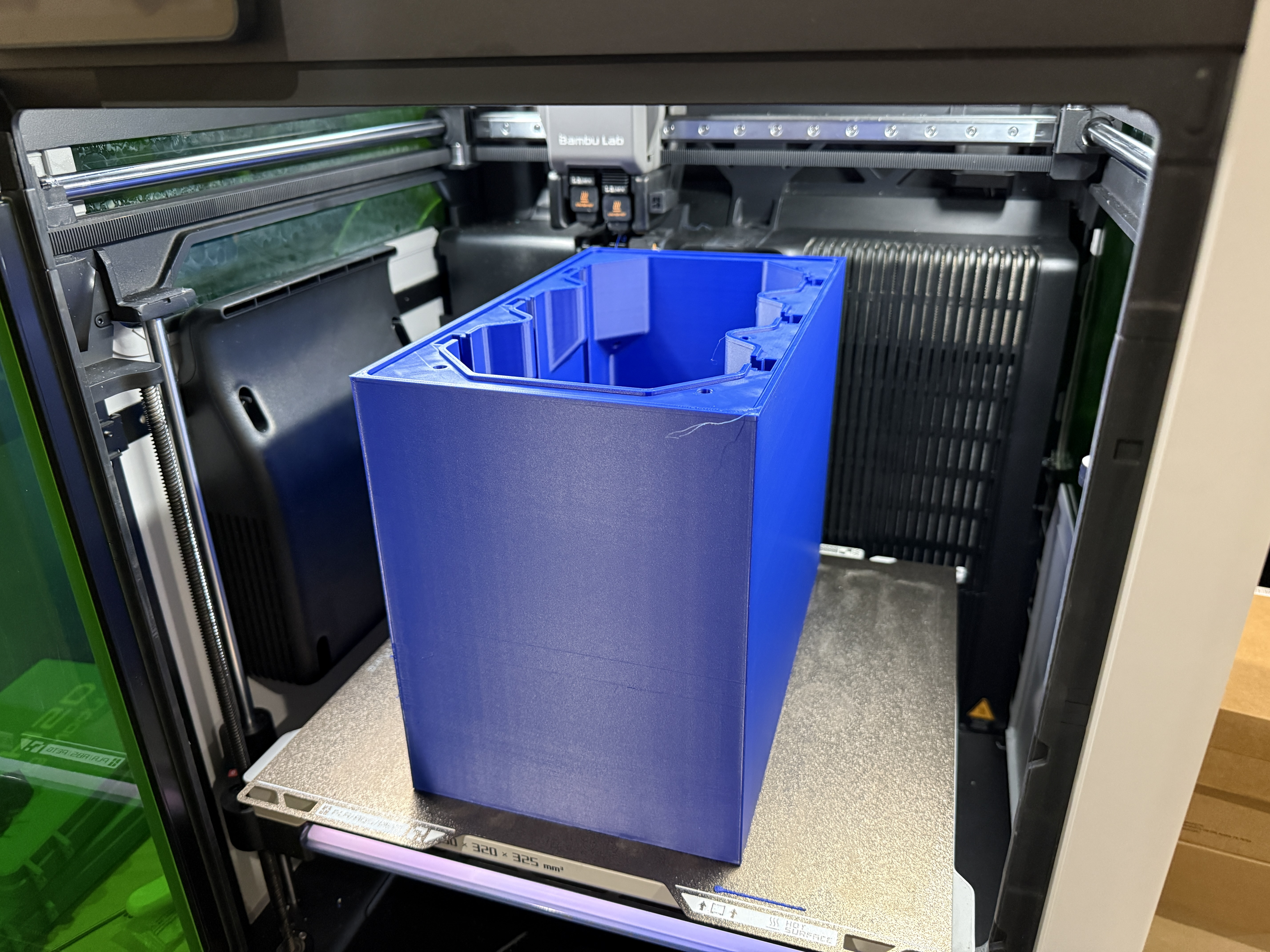
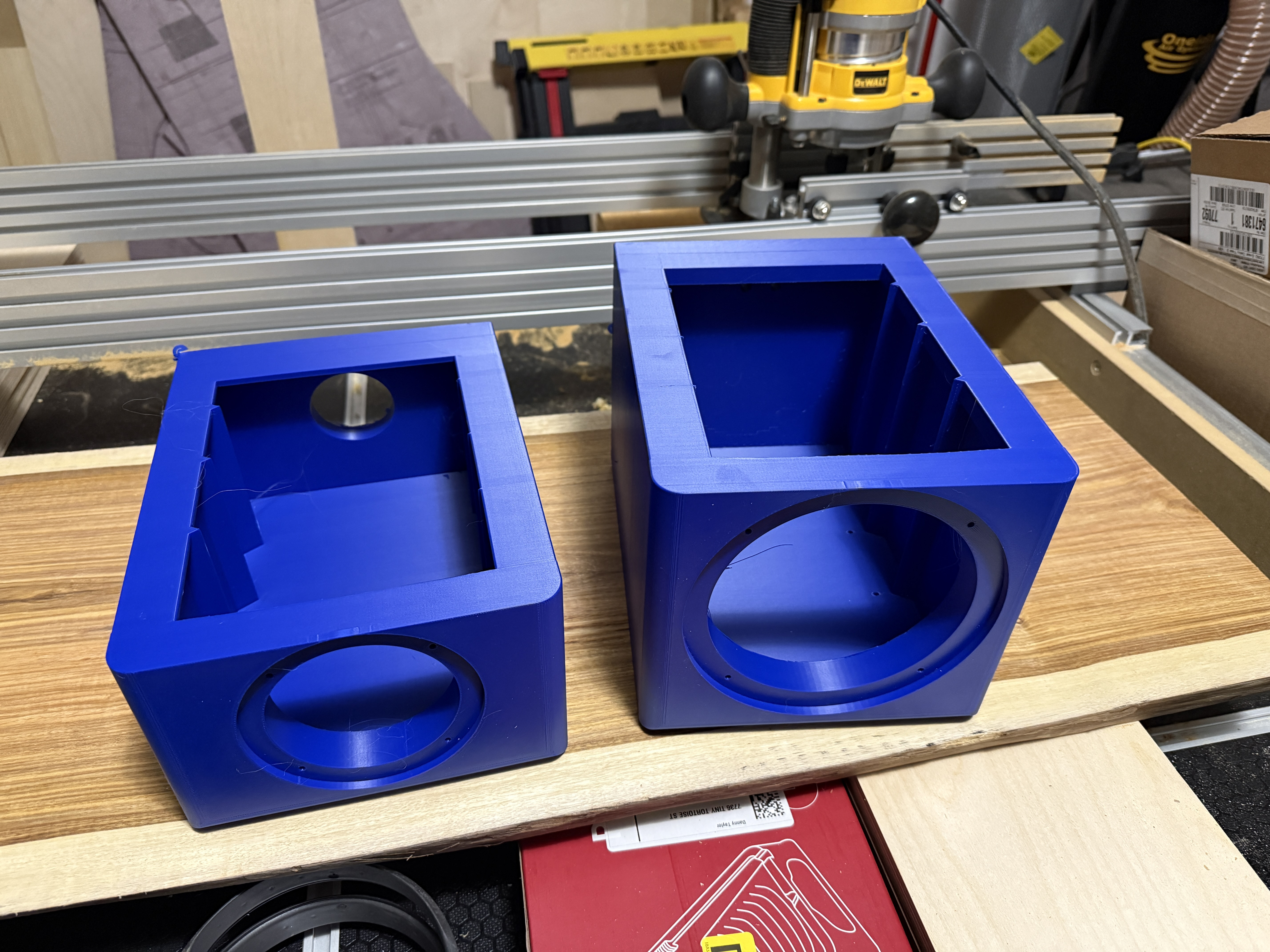
Alright, so I have a little more time and a few things have finished printing. First up is the cabinet sides and top - this was a test run so I had it printing fast and basically hollow, but it works for what I need right now.

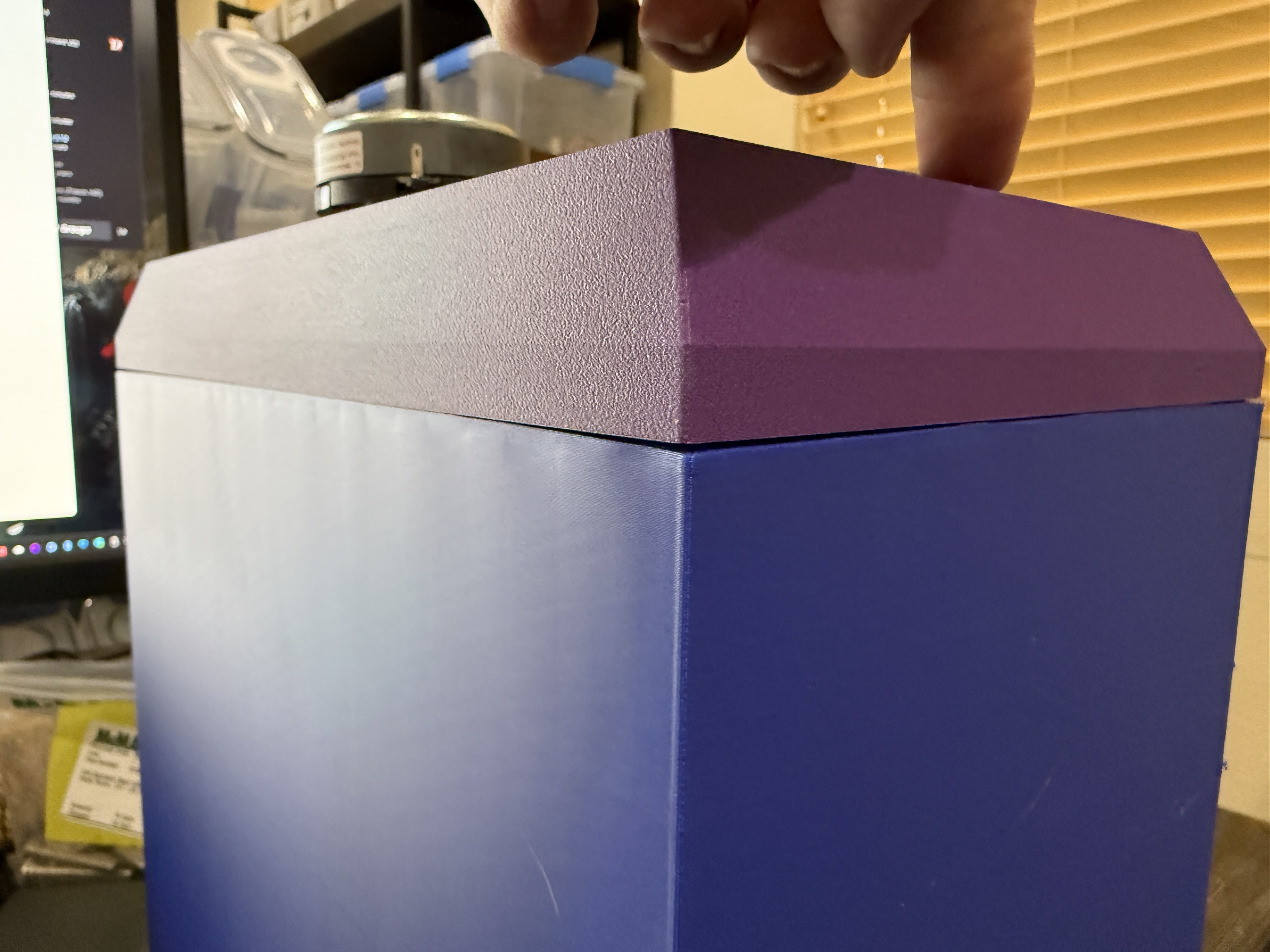
First impressions are pretty good. I’m continually impressed with what these machines can do even under stress. To go with the cabinet I also printed the original port and crossover platform so I could test fitment. Looks pretty good! It was a bit of a challenge to shove them in the last inch or so, but once they’re in I really don’t think they’re coming loose. Could use epoxy to be sure but I’m near certain it isn’t necessary.

Of course, there were problems too. Printing things this large tends to have the corners pull up off the plate. I’m not sure how to counter this, but I’ve seen it before. I can use better adhesive but sometimes that doesn’t help, the plate just comes up with the corners.

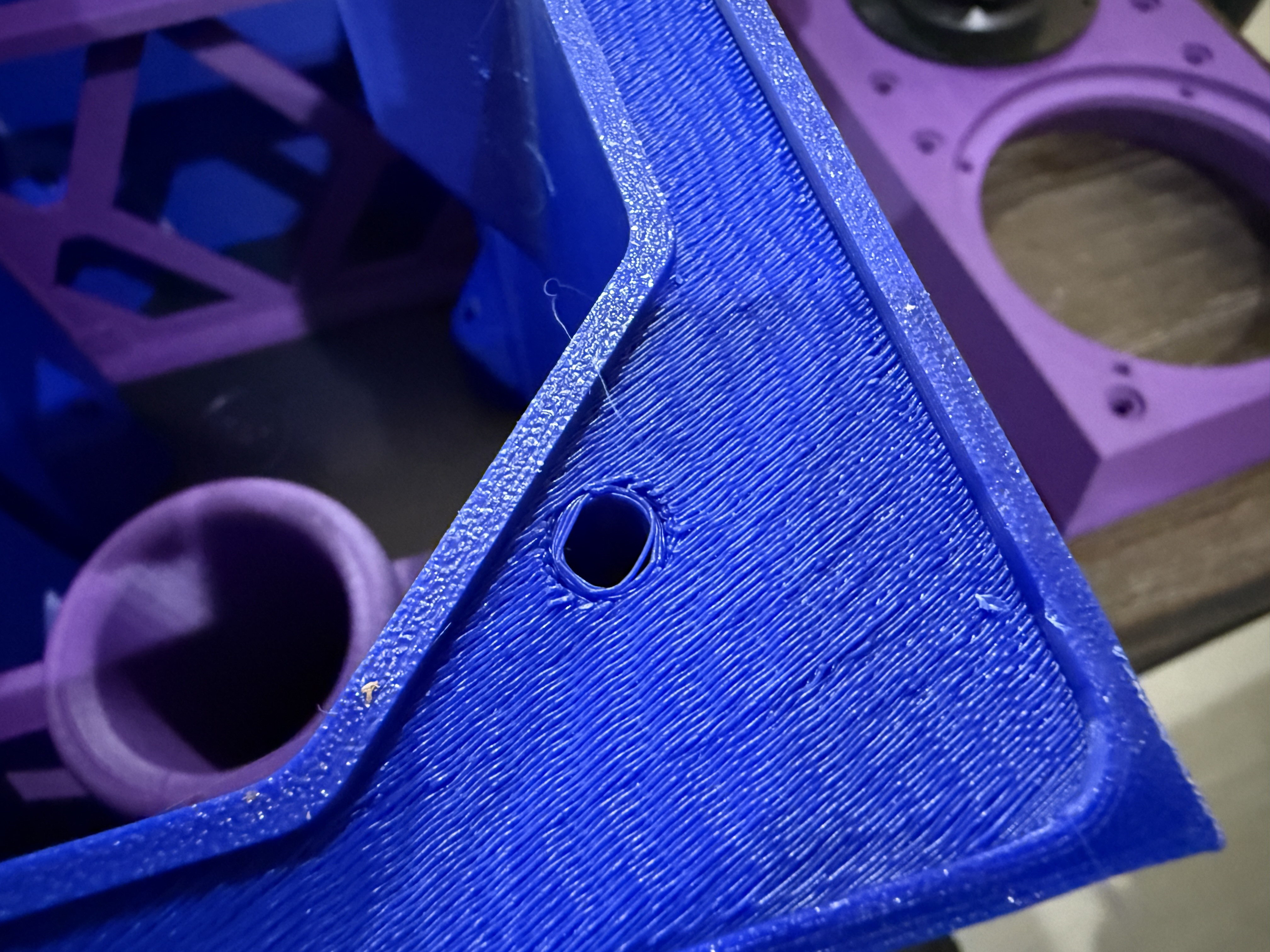
Another potential issue are the mounting holes on the front (I printed face down, so they were supported). I think this is because they aren’t considered one of the first few layers anymore, leading to the printer moving very fast through this section. I think I can counter this because I’ll be having it print more layers on the faces themselves (at 100%) and I’ll be slowing the printer down for the real print. Remember, this only took one night (~10 hours) to print where the real thing will take 3 days.

I also printed the new port. I like it!

4 Likes

Right on​:smiling_face_with_sunglasses::+1:t3:

You are correct that printing a LARGE print can be a pain if it (1) runs into an error or (2) runs out of filament. I think my next experiment is going be printing individual sides (like a flat pack) and replicate a “Locking miter” joint.

Regarding (1), I had a print where the filament got stuck and pulled loose from the nozzle but the printer continued to just print air for the next 6 hours without me realizing it. The good news was that it was near the beginning, so I didn’t waste too much filament.

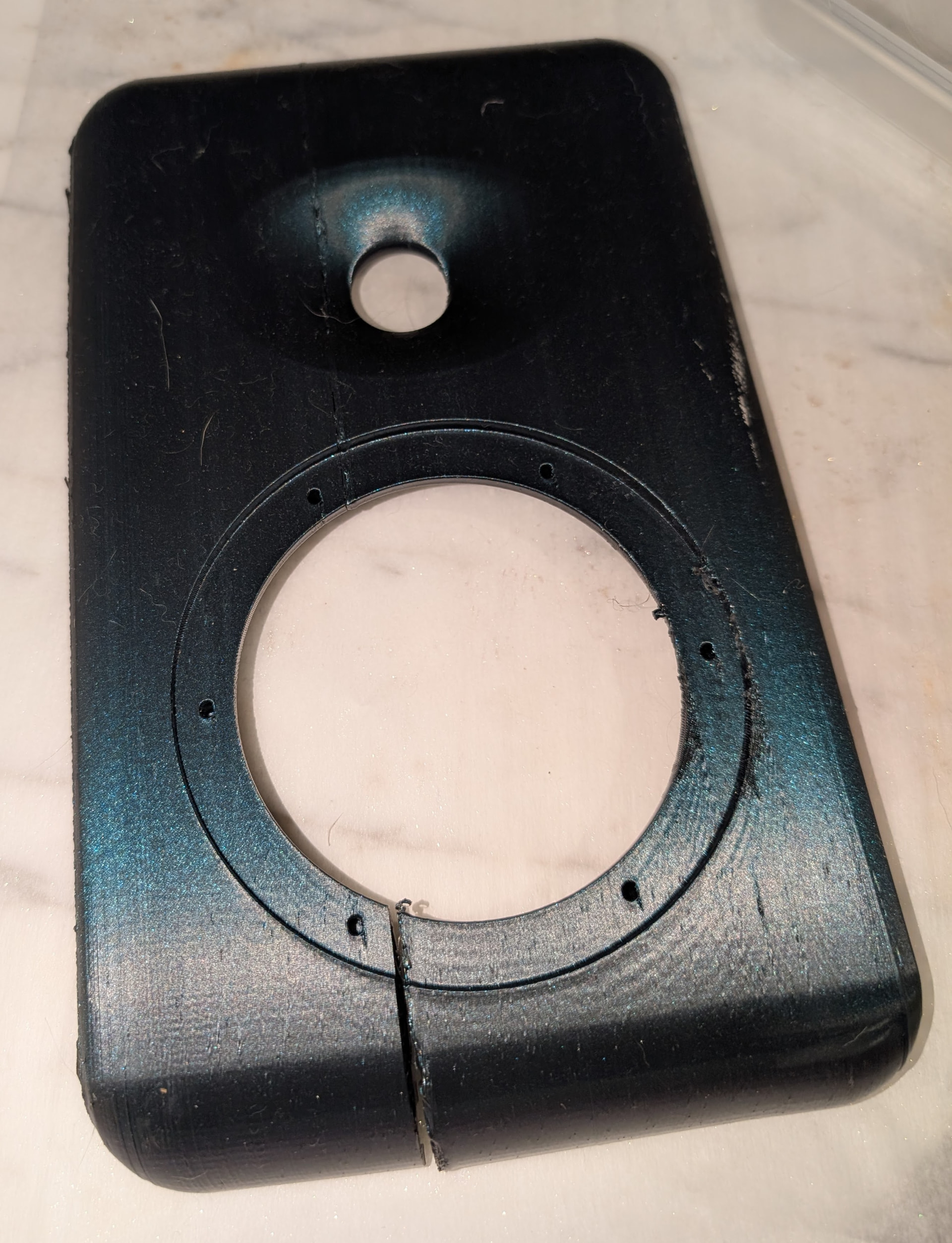
Regarding (2). The Bambu Labs printers are pretty good about stopping when they run out of filament and allowing you to resume the print. BUT, that doesn’t mean the seam will be invisible or even sturdy. Below is a pic of a baffle that was being printed on its side edge. It printed about 1/3rd of the baffle before running out of filament. I loaded the new spool and resumed and it actually looked fine. But once it was complete and cooled down, the crack was obvious. I am debating whether to use some black epoxy and clamp it together or just print a new baffle.

I haven’t had too much of an issue with changing filament; I think that is because my model keep the chamber warm until such time the filament is changed or the process is canceled. I also have the automated changer so, unless there is an error, it’ll change over by itself - VERY handy on a long print!

Do you have any ideas on how to keep the corners from warping?

I use a brim and that seems to help the corners a lot.

Why use carbon fiber petg? Other than weight I dont see any reason to. Carbon fiber is nasty stuff.

I just like the matte finish of it, mostly, but I also think it produces notably stiffer walls (totally a subjective observation). Is there a reason to avoid it? Other than not being able to sand it, I would think the CF aspect is pretty well contained in the PETG. It is, of course, at least twice the cost of normal PETG (if not more), which is also a consideration.

I have not used CF filament yet, but if I do, it will be because I want a matte black finish. The sheen of the Bambu Labs Matte PLA is great but I don’t want to print a whole cabinet in PLA.

Carbon fiber in filiment probably does more harm than good. Since it doesnt actually bond with the filimentit weakens the layer bonds. It is cancerus. The dust that cones off it will wear down componemts on the machine. It is hard on extruder parts and nozzels.

If the machine could extrude long fibers then carbon fiber could be amazing. Ground up bits of CF only adds dimensional stability but degrades pretty much everything else.

Fair points all around Ken, thanks for the input!

Possible random aside, how does the MAC-05 compare to the SB15CAC, and how available is it?

FR and distortion measurements posted on the old forum.. MAC-05 is about 1/3 way down the page: IEC test baffle. - Page 3 — MAC/DIY

Available from Hifiside’s JFcomponents.com. :https://www.jfcomponents.com/product-page/mac-05-aluminum-cone-midrange-mid-bass

[edit] As far as ongoing availability of the MAC drivers. I realy can’t say. It was a project that he and JR (and probably other folks) worked on to make happen. But that all happened before the markets got all mixed up with the tariff stuff. So might be best to order now however many you think you’d use in the future.

Even if SB is a bit better somehow, IMO that is a hard sell at over 4x the cost.

2 Likes

Thanks Drew, that is compelling. Jon Marsh got me thinking about making a new speaker entirely using the Peerless DA25TX tweeter, of which I happened to have at least five (!) pair sitting around when I panic bought them a while back. While I’m pretty sure PE will stop selling them again, I really have no reason to keep them sitting around when I could use them for some very nice gifted speakers. I’m trying to figure out what I’d pair them with while keeping the cabinet size around the 8L mark. The MAC-05 is on that short list, and I already have one pair of those I have yet to test.

So I’ll posit the same question to you fine folks I asked Jon. Keeping in mind these are speakers that will (probably) be entirely 3D printed and they’ll be kind of a ‘standard’ gift for close friends and family. Let’s say I’ll need to make five sets at a minimum over the next couple years, though parts availability for more would certainly be nice, the tweeter availability kind of makes that questionable right out of the gate.

Since the tweeters are (sort of) free and the cabinet will cost about the same as the Mechano23, that gives me around $300 per set for midwoofers, crossovers, and binding posts. Not that we have to use that, but it’s what I had originally planned for. Part of this could also be used for a small waveguide for the DA25TX if such a thing exists - I need to reread augerpro’s work again sometime to see if he got around to that one. Another part could be used for printed circuit boards as I would like to use some to speed up the manufacturing process, though I have no idea how to engineer those myself (currently).

In any case, this is my short list. Some high value, some expensive. Some unknowns, some knowns.

  1. Denovo Audio 5.5" Anarchy, of which the 8 ohm is still available at Cinergy Audio (but it probably won’t be restocked once gone)
  2. SB Acoustics SB15CAC (it exceeds $100 per unit but is a solid performer for sure, the cone color may also go favorably with several color pairs I’ll be using)
  3. SB Acoustics SB15NBAC is interesting to me but is an unknown performer - it might be new?
  4. The Peerless NE149W-08 can still be found at PE (but only 10 of them, and it may not be restocked after they are gone)
  5. Dayton Audio RS125?
  6. Dayton Audio ND-140?
  7. Dayton Audio SIG-150?
  8. Midwest Audio Club MAC-05?
  9. FaitalPro 5FE120 (this one is VERY interesting to me and I’m going to model it at some point for bass performance)
  10. Aurum Cantus AC120/50CK is even more pricey than the SB CAC line at $120/per but I REALLY like the appearance.

I should point out I’ll still be making AT LEAST one pair of Mechano23s as I have the drivers already.

1 Like