I haven’t used one, but would like to try it for getting more than 8 channels of DSP, which the most offered by the home audio ones. 12 channels seem to be available.
Yep, I’m looking at the 10 channel specifically only over the 8 channel due to the upgraded DAC chips to AKM. I currently have an older minidsp 4x10hd and like the software but I think the hardware leaves a little to be desired.
I had minidsp’s C-dsp 8x12 v2 for a short time, for home use (3ways and 2 way center active in fam room), had issues with some ground loop despite trying various ground lift switch options it had. Luckily I had bought it before prices ballooned on it and sold off internationally to not loose anything notable.
But couple years ago i bit the bullet and bought mindsp flex HTx (8 in out) and it is a touch sonically more transparent than the 2x4hd to me.
Would be curious to know how the helix’s are. And yeah, i dumped set of the PE sigma studio kernel boards and programmer as was a nuisance to toggle to program, then back to play and hoping what tried to setup working right heh - didnt have the patience.
I generally agree with this sentiment. I have used a few older MiniDsp items and an older Pioneer PRS 80 and all of these were just “okay” from a hardware perspective. The 2x4HD units did survive, but the 4x10 units kinda died and none of them were super clean sounding. They were pleasant but murky/veiled. I used them happily for years as they still sounded better than a passive crossover.
I can “unfortunately” convey that the new flex units I have in my home are real hifi gear. They sound incredibly clean and good. The unfortunate part is these are expensive - with the current tariffs. Hopefully this helps.
Iissed the boat on the flex units. I have used the 2x4 and the 2x4HD. The 2x4 HD is decent for small builds. I do however like the older nla 2x8 nanodigi, as it stays digital throughout input and output. Flip side now you need 4 identical DACs, I am using ultra cheap spdif to RCA converters, but some nice low cost DAC can be used - I need to get some 100$ current generation DAC - they measure and sound pretty good.
Thanks for the tip on the edit. I managed to find this and did edit my triple-quote post.
With the nano-digi and external dacs are you able to implement a timed phase delay in the software. I vaguely recall using a phase delay was not possible with earlier implementations using external DACS.
And, could you share a link to the external SPDIF to RCA dacs you are using ? Are they still generally inexpensive in the post-tariff era ?
Have to add, as I’ve been trying to migrate my work from home and ‘lab’ to the basement as wife wants the 1st floor office heh - but it all makes sense, just old n fat and stairs not ignorable. So, had temp setup going from wiim pro to minidsp 2x4hd analog input then to recent build of 4 channel ice effectively 60 x 4 into 8 ohm loads, doubles for 4ohm loads. Hampered initially with long usb to old usb mini that 2x4hd has didnt work, today new cable. So now computer source direct to mini2x4hd via usb, digital and no ADC, sounds much better. In short, i think the analog input (ADC) of minidsp’s before flex the pain point. Of course this me pontificating after too-tree IPA’s.
Prices seem to have come down. I paid 20-24 per from PE a long time back, can’t find the exact one now. But Walmart and Amazon seem to have quite a few in the 10-20$ range.
I am not sure I understood your question regarding phase delay. If you are referring to IIR filters, I haven’t tried it out. But you can put in a delay between each channel to time align the tweet, mid, woofer. I’ll look for a screen shot.
SPDIF signal has the timing clock, so multiple DACs work. USB does not, so multiple DAC may go out of sync.
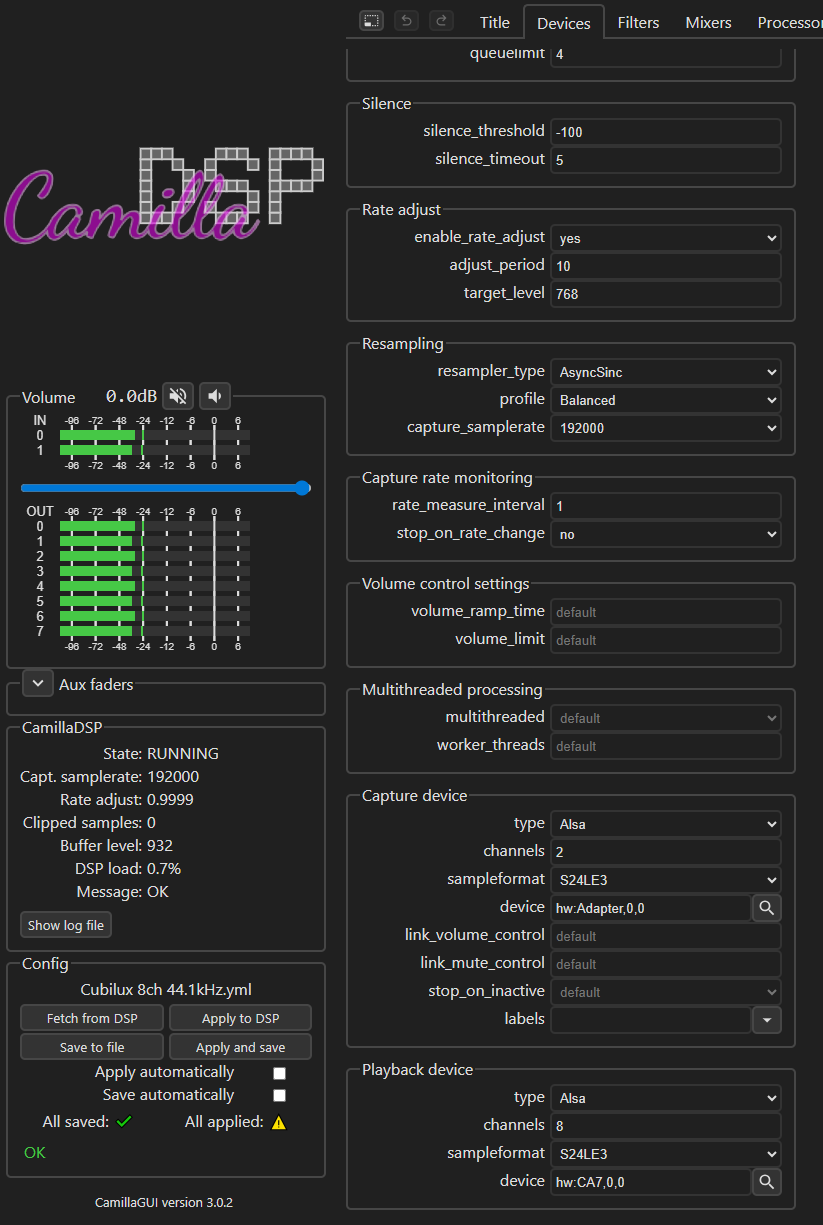
A raspberry pi + Cubilux spdif to USB + Cubilux CA7 8ch USB soundcard + CamillaDSP will allow for 2ch digital in and 8 analog channel out. If you have other USB sound cards/audio interfaces, they can be used in place of the CA7 (eg. Motu M4). The CamillaDSP GUI can be pulled up on any device on the network for real-time adjustments.
Yeah I looked into Camilla, just didn’t want to mess with programming a Raspberry Pi. Been through that with streamers and wanted something a little more turnkey. I’m sure it works well for those inclined to go through the process.
why do you need the usb to SPDIF - the sound card you linked is a usb one. I am not sure of the chain you are going through from the Pi. I supposed a DDC in line would clean up the noisy Pi, but i don’t know of any 8ch SPDIF sundcard - most seem to be 8 ch one.
I got an older presonus usb pro sound card, limited to 24bit 92k usb, that’s most probably what i’ll be using WHEN i get to the pi setup - it’s got all balanced out, so would be easy to get to the icepower amp (again WHEN I get to setup them up)!
I get that it can be intimidating, but the tutorial does a great job stepping you through it. It boils down to using an app to install Pi OS onto an SD card, then putting that card into the pi and powering it on. You’ll need to know the IP address of the pi on your network and then use putty (or other SSH tool) to connect to it via SSH. Once logged into the pi, you copy and paste 15 commands from the tutorial and CamillaDSP is up and running. You can use one of the config files if you are using the hardware outlined in the tutorial, or you’ll need to configure the devices tab for your devices. I’m happy to share the config file I use for the Cubilux devices I noted. If anyone needs assistance, I’m happy to help.
Ani, the CA7 does have audio in and could be used, but it’s analog. Since the DSP is done digitally, I want to remove any ADC. The SPDIF to USB captures 2ch digital audio from the WiiM Pro and then CamillaDSP does the DSP you configure before providing up to 8ch analog out via the CA7.
USB audio interfaces work great with CamillaDSP and some have digital in making them an all in one device.